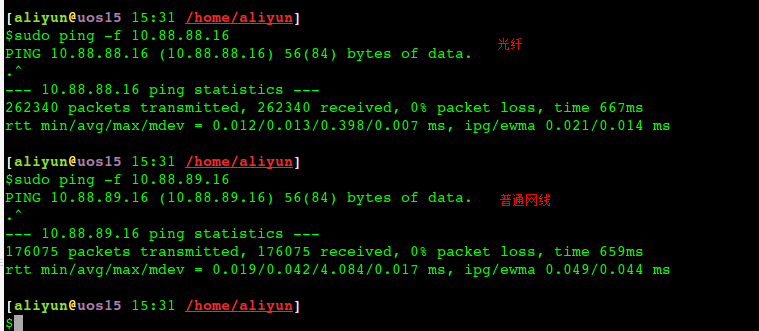
[aliyun@uos15 11:00 /home/aliyun] 以下88都是光口、89都是电口。 $ping -c 10 10.88.88.16 //光纤 PING 10.88.88.16 (10.88.88.16) 56(84) bytes of data. 64 bytes from 10.88.88.16: icmp_seq=1 ttl=64 time=0.058 ms 64 bytes from 10.88.88.16: icmp_seq=2 ttl=64 time=0.049 ms 64 bytes from 10.88.88.16: icmp_seq=3 ttl=64 time=0.053 ms 64 bytes from 10.88.88.16: icmp_seq=4 ttl=64 time=0.040 ms 64 bytes from 10.88.88.16: icmp_seq=5 ttl=64 time=0.053 ms 64 bytes from 10.88.88.16: icmp_seq=6 ttl=64 time=0.043 ms 64 bytes from 10.88.88.16: icmp_seq=7 ttl=64 time=0.038 ms 64 bytes from 10.88.88.16: icmp_seq=8 ttl=64 time=0.050 ms 64 bytes from 10.88.88.16: icmp_seq=9 ttl=64 time=0.043 ms 64 bytes from 10.88.88.16: icmp_seq=10 ttl=64 time=0.064 ms
--- 10.88.88.16 ping statistics --- 10 packets transmitted, 10 received, 0% packet loss, time 159ms rtt min/avg/max/mdev = 0.038/0.049/0.064/0.008 ms
[aliyun@uos15 11:01 /home/aliyun] $ping -c 10 10.88.89.16 //电口 PING 10.88.89.16 (10.88.89.16) 56(84) bytes of data. 64 bytes from 10.88.89.16: icmp_seq=1 ttl=64 time=0.087 ms 64 bytes from 10.88.89.16: icmp_seq=2 ttl=64 time=0.053 ms 64 bytes from 10.88.89.16: icmp_seq=3 ttl=64 time=0.095 ms 64 bytes from 10.88.89.16: icmp_seq=4 ttl=64 time=0.391 ms 64 bytes from 10.88.89.16: icmp_seq=5 ttl=64 time=0.051 ms 64 bytes from 10.88.89.16: icmp_seq=6 ttl=64 time=0.343 ms 64 bytes from 10.88.89.16: icmp_seq=7 ttl=64 time=0.045 ms 64 bytes from 10.88.89.16: icmp_seq=8 ttl=64 time=0.341 ms 64 bytes from 10.88.89.16: icmp_seq=9 ttl=64 time=0.054 ms 64 bytes from 10.88.89.16: icmp_seq=10 ttl=64 time=0.066 ms
--- 10.88.89.16 ping statistics --- 10 packets transmitted, 10 received, 0% packet loss, time 149ms rtt min/avg/max/mdev = 0.045/0.152/0.391/0.136 ms
Mode 4 (802.3ad): This mode creates aggregation groups that share the same speed and duplex settings, and it requires a switch that supports an IEEE 802.3ad dynamic link. Mode 4 uses all interfaces in the active aggregation group. For example, you can aggregate three 1 GB per second (GBPS) ports into a 3 GBPS trunk port. This is equivalent to having one interface with 3 GBPS speed. It provides fault tolerance and load balancing.
#ethtool bond0 Settings for bond0: Supported ports: [ ] Supported link modes: Not reported Supported pause frame use: No Supports auto-negotiation: No Advertised link modes: Not reported Advertised pause frame use: No Advertised auto-negotiation: No Speed: 20000Mb/s Duplex: Full Port: Other PHYAD: 0 Transceiver: internal Auto-negotiation: off Link detected: yes
CPU 进入节能模式之前,设定可空闲的 CPU 数量。如果有大于阀值数量的 CPU 是大于一个标准的偏差,该差值低于平均软中断工作负载,以及没有 CPU 是大于一个标准偏差,且该偏差高出平均,并有多于一个的 irq 分配给它们,一个 CPU 将处于节能模式。在节能模式中,CPU 不是 irqbalance 的一部分,所以它在有必要时才会被唤醒。
cat /etc/sysconfig/irqbalance # IRQBALANCE_BANNED_CPUS # 64 bit bitmask which allows you to indicate which cpu's should # be skipped when reblancing irqs. Cpu numbers which have their # corresponding bits set to one in this mask will not have any # irq's assigned to them on rebalance #绑定软中断到8-15core, 每位表示4core #IRQBALANCE_BANNED_CPUS=ffffffff,ffff00ff #绑定软中断到8-15core和第65core IRQBALANCE_BANNED_CPUS=ffffffff,fffffdff,ffffffff,ffff00ff
#!/bin/bash # This is the default setting of networking multiqueue and irq affinity # 1. enable multiqueue if available # 2. irq affinity optimization # 3. stop irqbalance service # set and check multiqueue
function set_check_multiqueue() { eth=$1 log_file=$2 queue_num=$(ethtool -l $eth | grep -ia5 'pre-set' | grep -i combined | awk {'print $2'}) if [ $queue_num -gt 1 ]; then # set multiqueue ethtool -L $eth combined $queue_num # check multiqueue setting cur_q_num=$(ethtool -l $eth | grep -iA5 current | grep -i combined | awk {'print $2'}) if [ "X$queue_num" != "X$cur_q_num" ]; then echo "Failed to set $eth queue size to $queue_num" >> $log_file echo "after setting, pre-set queue num: $queue_num , current: $cur_q_num" >> $log_file return 1 else echo "OK. set $eth queue size to $queue_num" >> $log_file fi else echo "only support $queue_num queue; no need to enable multiqueue on $eth" >> $log_file fi } #set irq affinity function set_irq_smpaffinity() { log_file=$1 node_dir=/sys/devices/system/node for i in $(ls -d $node_dir/node*); do i=${i/*node/} done echo "max node :$i" >> $log_file node_cpumax=$(cat /sys/devices/system/node/node${i}/cpulist |awk -F- '{print $NF}') irqs=($(cat /proc/interrupts |grep virtio |grep put | awk -F: '{print $1}')) core=0 for irq in ${irqs[@]};do VEC=$core if [ $VEC -ge 32 ];then let "IDX = $VEC / 32" MASK_FILL="" MASK_ZERO="00000000" for ((i=1; i<=$IDX;i++)) do MASK_FILL="${MASK_FILL},${MASK_ZERO}" done let "VEC -= 32 * $IDX" MASK_TMP=$((1<<$VEC)) MASK=$(printf "%X%s" $MASK_TMP $MASK_FILL) else MASK_TMP=$((1<<$VEC)) MASK=$(printf "%X" $MASK_TMP) fi echo $MASK > /proc/irq/$irq/smp_affinity echo "mask:$MASK, irq:$irq" >> $log_file core=$(((core+1)%(node_cpumax+1))) done } # stop irqbalance service function stop_irqblance() { log_file=$1 ret=0 if [ "X" != "X$(ps -ef | grep irqbalance | grep -v grep)" ]; then if which systemctl;then systemctl stop irqbalance else service irqbalance stop fi if [ $? -ne 0 ]; then echo "Failed to stop irqbalance" >> $log_file ret=1 fi else echo "OK. irqbalance stoped." >> $log_file fi return $ret } # main logic function main() { ecs_network_log=/var/log/ecs_network_optimization.log ret_value=0 echo "running $0" > $ecs_network_log echo "======== ECS network setting starts $(date +'%Y-%m-%d %H:%M:%S') ========" >> $ecs_network_log # we assume your NIC interface(s) is/are like eth* eth_dirs=$(ls -d /sys/class/net/eth*) if [ "X$eth_dirs" = "X" ]; then echo "ERROR! can not find any ethX in /sys/class/net/ dir." >> $ecs_network_log ret_value=1 fi for i in $eth_dirs do cur_eth=$(basename $i) echo "optimize network performance: current device $cur_eth" >> $ecs_network_log # only optimize virtio_net device driver=$(basename $(readlink $i/device/driver)) if ! echo $driver | grep -q virtio; then echo "ignore device $cur_eth with driver $driver" >> $ecs_network_log continue fi echo "set and check multiqueue on $cur_eth" >> $ecs_network_log set_check_multiqueue $cur_eth $ecs_network_log if [ $? -ne 0 ]; then echo "Failed to set multiqueue on $cur_eth" >> $ecs_network_log ret_value=1 fi done stop_irqblance $ecs_network_log set_irq_smpaffinity $ecs_network_log echo "======== ECS network setting END $(date +'%Y-%m-%d %H:%M:%S') ========" >> $ecs_network_log return $ret_value } # program starts here main exit $?
查询的rps绑定情况的脚本 get_rps.sh
1 2 3 4 5 6
#!/bin/bash # 获取当前rps情况 for i in $(ls /sys/class/net/eth0/queues/rx-*/rps_cpus); do echo $i cat $i done
RSS 和 RPS
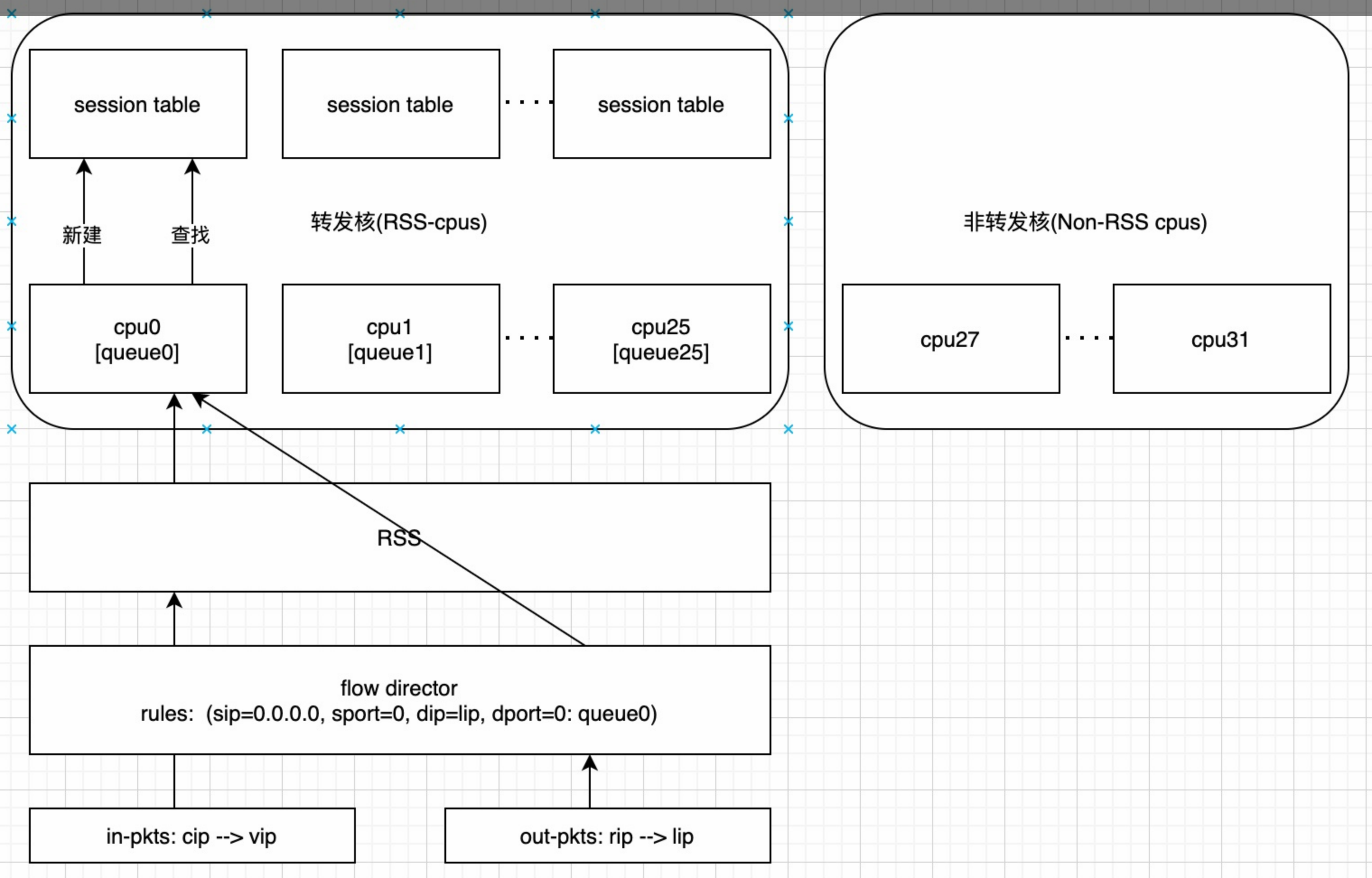
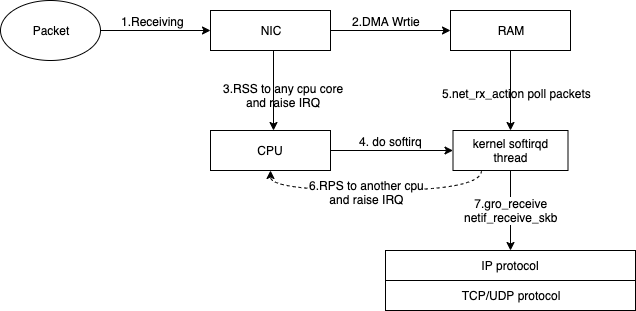
RSS:即receive side steering,利用网卡的多队列特性,将每个核分别跟网卡的一个首发队列绑定,以达到网卡硬中断和软中断均衡的负载在各个CPU上。他要求网卡必须要支持多队列特性。
default dev bond0 ---默认路由,后面的可以省略 10.0.0.0/8 via 11.158.239.247 dev bond0 11.0.0.0/8 via 11.158.239.247 dev bond0 30.0.0.0/8 via 11.158.239.247 dev bond0 172.16.0.0/12 via 11.158.239.247 dev bond0 192.168.0.0/16 via 11.158.239.247 dev bond0 100.64.0.0/10 via 11.158.239.247 dev bond0 33.0.0.0/8 via 11.158.239.247 dev bond0
或者用sed在文件第一行添加
1 2
sed -i '/default /d' /etc/sysconfig/network-scripts/route-bond0 //先删除默认路由(如果有) sed -i '1 i\default dev bond0' /etc/sysconfig/network-scripts/route-bond0 //添加
Centos 7的话需要在 /etc/sysconfig/network 中添加创建默认路由的命令
1 2 3
# cat /etc/sysconfig/network # Created by anaconda ip route add default dev eth0
kernel: ixgbe 0000:3b:00.1 eth1: renamed from enp59s0f1 kernel: i40e 0000:88:00.0 eth7: renamed from enp136s0
同时network service 会启动,进而遍历etc/sysconfig/network-scripts下面的脚本,我们配置的bond0, 默认路由,通常会在这个阶段运行,创建
1 2 3 4 5 6 7 8 9 10
kernel: bond0: Enslaving eth0 as a backup interface with a down link
kernel: ixgbe 0000:3b:00.0 eth0: detected SFP+: 5
kernel: power_meter ACPI000D:00: Found ACPI power meter.
kernel: power_meter ACPI000D:00: Ignoring unsafe software power cap!
kernel: ixgbe 0000:3b:00.1: registered PHC device on eth1
kernel: ixgbe 0000:3b:00.0 eth0: NIC Link is Up 10 Gbps, Flow Control: RX/TX
kernel: bond0: Enslaving eth1 as a backup interface with a down link
kernel: bond0: Warning: No 802.3ad response from the link partner for any adapters in the bond
kernel: bond0: link status definitely up for interface eth0, 10000 Mbps full duplex
kernel: bond0: first active interface up!
A rule in /usr/lib/udev/rules.d/60-net.rules instructs the udev helper utility, /lib/udev/rename_device, to look into all /etc/sysconfig/network-scripts/ifcfg-*suffix* files. If it finds an ifcfg file with a HWADDR entry matching the MAC address of an interface it renames the interface to the name given in the ifcfg file by the DEVICE directive.(根据提前定义好的ifcfg-网卡名来命名网卡–依赖mac匹配,如果网卡的ifconfig文件中未加入HWADDR,则rename脚本并不会根据配置文件去重命名网卡)
A rule in /usr/lib/udev/rules.d/71-biosdevname.rules instructs biosdevname to rename the interface according to its naming policy, provided that it was not renamed in a previous step, biosdevname is installed, and biosdevname=0 was not given as a kernel command on the boot command line.
A rule in /lib/udev/rules.d/75-net-description.rules instructs udev to fill in the internal udev device property values ID_NET_NAME_ONBOARD, ID_NET_NAME_SLOT, ID_NET_NAME_PATH, ID_NET_NAME_MAC by examining the network interface device. Note, that some device properties might be undefined.
A rule in /usr/lib/udev/rules.d/80-net-name-slot.rules instructs udev to rename the interface, provided that it was not renamed in step 1 or 2, and the kernel parameter net.ifnames=0 was not given, according to the following priority: ID_NET_NAME_ONBOARD, ID_NET_NAME_SLOT, ID_NET_NAME_PATH. It falls through to the next in the list, if one is unset. If none of these are set, then the interface will not be renamed.
The following is an excerpt from Chapter 11 of the RHEL 7 “Networking Guide”:
Scheme 1: Names incorporating Firmware or BIOS provided index numbers for on-board devices (example: eno1), are applied if that information from the firmware or BIOS is applicable and available, else falling back to scheme 2.
Scheme 2: Names incorporating Firmware or BIOS provided PCI Express hotplug slot index numbers (example: ens1) are applied if that information from the firmware or BIOS is applicable and available, else falling back to scheme 3.
Scheme 3: Names incorporating physical location of the connector of the hardware (example: enp2s0), are applied if applicable, else falling directly back to scheme 5 in all other cases.
Scheme 4: Names incorporating interface’s MAC address (example: enx78e7d1ea46da), is not used by default, but is available if the user chooses.
Scheme 5: The traditional unpredictable kernel naming scheme, is used if all other methods fail (example: eth0).
o<index>           on-board device index number
s<slot>            hotplug slot index number
x<MAC>             MAC address
p<bus>s<slot>      PCI geographical location
p<bus>s<slot>      USB port number chain