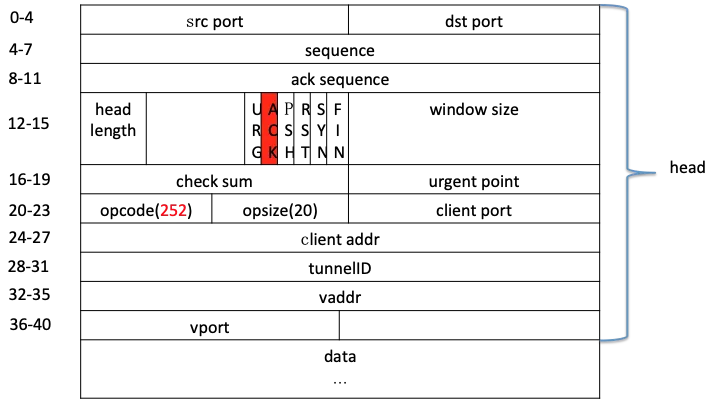
1
2
3
4
5
6
7
8
9
10
11
12
13
14
15
16
17
18
19
20
21
22
23
24
25
26
27
28
29
30
31
32
33
34
35
36
37
38
39
40
41
42
43
44
45
46
47
48
49
50
51
52
53
54
55
56
57
58
59
60
61
62
63
64
65
66
67
68
69
70
71
72
73
74
75
76
77
78
79
80
81
82
83
84
85
86
87
88
89
90
91
92
93
94
95
96
97
98
99
100
101
102
103
104
105
106
107
108
109
110
111
112
113
114
115
116
117
118
119
120
121
122
123
124
125
126
127
128
129
130
131
132
133
134
135
136
137
138
139
140
141
142
143
144
145
146
147
148
149
150
151
152
153
154
155
156
157
158
159
160
161
162
163
164
165
166
167
168
169
170
171
172
173
174
175
176
177
178
179
180
181
182
183
184
185
186
187
188
189
190
191
192
193
194
195
196
197
198
199
200
201
202
203
204
205
206
207
208
209
210
211
212
213
214
215
216
217
218
219
220
221
222
223
224
225
226
227
228
229
| //抓取一个子网范围
tcpdump -i bond0 port 3001 and net 1.2.3.0/24 and host not 1.2.3.211 -nn -X
//抓取 DNAT 包,tcp options 里面的 246 代表 DNAT
tcpdump -nn –vvv -i eth0 tcp dst port 3306 and '(tcp[tcpflags] & (tcp-syn) != 0) and (tcp[20] =246) '
//在上面的基础上,抓取指定 vip:10.142.*.*
tcpdump -nn –vvv -i eth0 tcp dst port 3306 and '(tcp[tcpflags] & (tcp-syn) != 0) and tcp[20]=246 and tcp[24]=10 and tcp[25]=142'
//抓取 DNAT 包,tcp options 里面的 252 代表 DNAT
tcpdump -nn –vvv -i eth0 tcp dst port 3306 and '(tcp[tcpflags] & (tcp-ack) != 0) and (tcp[20] =252) '
//根据指定的VPC IP抓包,例如172.16.x.x
tcpdump -nn –vvv -i eth0 tcp dst port 3306 and '(tcp[tcpflags] & (tcp-ack) != 0) and (tcp[32] =172) and (tcp[33] =16)'
//根据客户端IP抓包FNAT的包,例如172.16.x.x
tcpdump -nn –vvv -i eth0 tcp dst port 3306 and '(tcp[tcpflags] & (tcp-ack) != 0) and(tcp[20]=252) and (tcp[24]=172) and (tcp[25]=16)'
用tcpdump抓取并保存包:
sudo tcpdump -i eth0 port 3306 -w plantegg.cap
抓到的包存储在plantegg.cap中,可以用作wireshark、tshark详细分析
如果明确知道目的ip、端口等可以通过指定条件来明确只抓取某个连接的包
只抓本机的8080端口:
tcpdump -i eth0 '(src port 8001 and src host 11.59.10.106) or (dst port 8001 and dst host 11.59.10.106)' -nn -X
//http 流量
// -f 抓取过滤条件 tcp port 80 and host 11.59.10.106
//-Y 展示过滤条件
tshark -i eth0 -f '(tcp src port 8080 and src host 11.59.10.106) or (tcp dst port 8080 and dst host 11.59.10.106)' -t a -Y " (http.request or http.response)" -T fields -e frame.number -e frame.time -e frame.time_delta_displayed -e ip.src -e tcp.srcport -e tcp.dstport -e ip.dst -e http.request.full_uri -e http.response.code -e http.response.phrase
抓取详细SQL语句:
sudo tshark -i eth0 -Y "mysql.command==3" -T fields -e mysql.query
sudo tshark -i eth0 -R mysql.query -T fields -e mysql.query
sudo tshark -i any -f 'port 8527' -s 0 -l -w - |strings
#parse 8507/4444 as mysql protocol, default only parse 3306 as mysql.
sudo tshark -i eth0 -d tcp.port==8507,mysql -T fields -e mysql.query 'port 8507'
sudo tshark -i any -c 50 -d tcp.port==4444,mysql -Y " ((tcp.port eq 4444 ) )" -o tcp.calculate_timestamps:true -T fields -e frame.number -e frame.time_epoch -e frame.time_delta_displayed -e ip.src -e tcp.srcport -e tcp.dstport -e ip.dst -e tcp.time_delta -e tcp.stream -e tcp.len -e mysql.query
sudo tshark -i eth0 -R "ip.addr==10.18.106.95" -d tcp.port==3306,mysql -T fields -e mysql.query 'port 3306'
sudo tshark -i eth0 -R "tcp.srcport==62877" -d tcp.port==3001,mysql -T fields -e tcp.srcport -e mysql.query 'port 3001'
sudo tshark -i br1.10 -Y tcp.port==4000,mysql -T fields -e tcp.srcport -e mysql.query 'port 4000'
tshark -i br1.10 -d tcp.port==4000,mysql -T fields -e tcp.srcport -e _ws.col.Info -e mysql.query
tshark -i eth0 -d tcp.port==4000,mysql -T fields -e tcp.srcport -e _ws.col.Info -e mysql.query
//将3307端口解析成MySQL 协议分析
tshark -i lo -d tcp.port==3307,mysql -T fields -e frame.number -e frame.time -e frame.time_delta -e tcp.srcport -e tcp.dstport -e tcp.len -e _ws.col.Info -e mysql.query
如果MySQL开启了SSL,那么抓包后的内容tshark/wireshark分析不到MySQL的具体内容,可以强制关闭:connectionProperties里加上useSSL=false
查看SQL具体内容
sudo tshark -r gege_plantegg.cap -Y "mysql.query or ( tcp.stream==1)" -o tcp.calculate_timestamps:true -T fields -e frame.number -e frame.time_epoch -e frame.time_delta_displayed -e ip.src -e tcp.srcport -e tcp.dstport -e ip.dst -e tcp.time_delta -e frame.time_delta_displayed -e tcp.stream -e tcp.len -e mysql.query
按mysql查询分析响应时间
对于rt分析,要注意一个query多个response情况(response结果多,分包了),分析这种rt的时候只看query之后的第一个response,其它连续response需要忽略掉。
以上抓包结果文件可以用tshark进行详细分析
对抓包按 stream 进行切分:
for i in {0..314};do tshark -r 11216253112_3055.pcap -Y "tcp.stream eq $i" -w $i.pcap; done
tshark -r 0.pcap "ip.src eq 11.216.253.112" -T fields -e frame.number -e frame.time_delta -e ip.src -e tcp.srcport -e tcp.dstport -e ip.dst -e tcp.time_delta -e tcp.stream -e tcp.len -e tcp.analysis.ack_rtt
分析MySQL rt,倒数第四列基本就是rt
tshark -r gege_plantegg.pcap -Y " ((tcp.srcport eq 3306 ) and tcp.len>0 )" -o tcp.calculate_timestamps:true -T fields -e frame.number -e frame.time_epoch -e frame.time_delta_displayed -e ip.src -e tcp.srcport -e tcp.dstport -e ip.dst -e tcp.time_delta -e tcp.stream -e tcp.len -e tcp.analysis.ack_rtt
或者排序一下
tshark -r 213_php.cap -Y "mysql.query or ( tcp.srcport==3306)" -o tcp.calculate_timestamps:true -T fields -e frame.number -e frame.time_epoch -e frame.time_delta_displayed -e ip.src -e tcp.srcport -e tcp.dstport -e ip.dst -e tcp.time_delta -e tcp.stream -e tcp.len -e mysql.query |sort -nk9 -nk1
MySQL响应时间直方图【第八列的含义-- Time since previous frame in this TCP stream: seconds】:
tshark -r gege_plantegg.pcap -Y "mysql.query or (tcp.srcport3306 and tcp.len>60)" -o tcp.calculate_timestamps:true -T fields -e frame.number -e frame.time_epoch -e frame.time_delta_displayed -e ip.src -e tcp.srcport -e tcp.dstport -e ip.dst -e tcp.time_delta -e tcp.stream -e tcp.len | awk 'BEGIN {sum0=0;sum3=0;sum10=0;sum30=0;sum50=0;sum100=0;sum300=0;sum500=0;sum1000=0;sumo=0;count=0;sum=0} {rt=$8; if(rt>=0.000) sum=sum+rt; count=count+1; if(rt<=0.000) sum0=sum0+1; else if(rt<0.003) sum3=sum3+1 ; else if(rt<0.01) sum10=sum10+1; else if(rt<0.03) sum30=sum30+1; else if(rt<0.05) sum50=sum50+1; else if(rt < 0.1) sum100=sum100+1; else if(rt < 0.3) sum300=sum300+1; else if(rt < 0.5) sum500=sum500+1; else if(rt < 1) sum1000=sum1000+1; else sum=sum+1 ;} END{printf "-------------\n3ms:\t%s \n10ms:\t%s \n30ms:\t%s \n50ms:\t%s \n100ms:\t%s \n300ms:\t%s \n500ms:\t%s \n1000ms:\t%s \n>1s:\t %s\n-------------\navg: %.6f \n" , sum3,sum10,sum30,sum50,sum100,sum300,sum500,sum1000,sumo,sum/count;}'
按http response分析响应时间
tshark -nr 213_php.cap -o tcp.calculate_timestamps:true -Y "http.request or http.response" -T fields -e frame.number -e frame.time_epoch -e frame.time_delta_displayed -e ip.src -e ip.dst -e tcp.stream -e http.request.full_uri -e http.response.code -e http.response.phrase | sort -nk6 -nk1
分析rtt、丢包、deplicate等等,可以得到整体网络状态
$ tshark -r retrans.cap -q -z io,stat,1,"AVG(tcp.analysis.ack_rtt)tcp.analysis.ack_rtt","COUNT(tcp.analysis.retransmission) tcp.analysis.retransmission","COUNT(tcp.analysis.fast_retransmission) tcp.analysis.fast_retransmission","COUNT(tcp.analysis.duplicate_ack) tcp.analysis.duplicate_ack","COUNT(tcp.analysis.lost_segment) tcp.analysis.lost_segment","MIN(tcp.window_size)tcp.window_size"
===================================================================================
| IO Statistics |
| |
| Duration: 89.892365 secs |
| Interval: 2 secs |
| |
| Col 1: AVG(tcp.analysis.ack_rtt)tcp.analysis.ack_rtt |
| 2: COUNT(tcp.analysis.retransmission) tcp.analysis.retransmission |
| 3: COUNT(tcp.analysis.fast_retransmission) tcp.analysis.fast_retransmission |
| 4: COUNT(tcp.analysis.duplicate_ack) tcp.analysis.duplicate_ack |
| 5: COUNT(tcp.analysis.lost_segment) tcp.analysis.lost_segment |
| 6: AVG(tcp.window_size)tcp.window_size |
|---------------------------------------------------------------------------------|
| |1 |2 |3 |4 |5 |6 | |
| Interval | AVG | COUNT | COUNT | COUNT | COUNT | AVG | |
|-------------------------------------------------------------| |
| 0 <> 2 | 0.001152 | 0 | 0 | 0 | 0 | 4206 | |
| 2 <> 4 | 0.002088 | 0 | 0 | 0 | 1 | 6931 | |
| 4 <> 6 | 0.001512 | 0 | 0 | 0 | 0 | 7099 | |
| 6 <> 8 | 0.002859 | 0 | 0 | 0 | 0 | 7171 | |
| 8 <> 10 | 0.001716 | 0 | 0 | 0 | 0 | 6472 | |
| 10 <> 12 | 0.000319 | 0 | 0 | 0 | 2 | 5575 | |
| 12 <> 14 | 0.002030 | 0 | 0 | 0 | 0 | 6922 | |
| 14 <> 16 | 0.003371 | 0 | 0 | 0 | 2 | 5884 | |
| 16 <> 18 | 0.000138 | 0 | 0 | 0 | 1 | 3480 | |
| 18 <> 20 | 0.000999 | 0 | 0 | 0 | 4 | 6665 | |
| 20 <> 22 | 0.000682 | 0 | 0 | 41 | 2 | 5484 | |
| 22 <> 24 | 0.002302 | 2 | 0 | 19 | 0 | 7127 | |
| 24 <> 26 | 0.000156 | 1 | 0 | 22 | 0 | 3042 | |
| 26 <> 28 | 0.000000 | 1 | 0 | 19 | 1 | 152 | |
| 28 <> 30 | 0.001498 | 1 | 0 | 24 | 0 | 5615 | |
| 30 <> 32 | 0.000235 | 0 | 0 | 44 | 0 | 1880 | |
1
===================================================================================
2
| IO Statistics |
3
| |
4
| Duration: 89.892365 secs |
5
| Interval: 2 secs |
6
| |
7
| Col 1: AVG(tcp.analysis.ack_rtt)tcp.analysis.ack_rtt |
8
| 2: COUNT(tcp.analysis.retransmission) tcp.analysis.retransmission |
9
| 3: COUNT(tcp.analysis.fast_retransmission) tcp.analysis.fast_retransmission |
10
| 4: COUNT(tcp.analysis.duplicate_ack) tcp.analysis.duplicate_ack |
11
| 5: COUNT(tcp.analysis.lost_segment) tcp.analysis.lost_segment |
12
| 6: AVG(tcp.window_size)tcp.window_size |
13
|---------------------------------------------------------------------------------|
14
| |1 |2 |3 |4 |5 |6 | |
15
| Interval | AVG | COUNT | COUNT | COUNT | COUNT | AVG | |
16
|-------------------------------------------------------------| |
17
| 0 <> 2 | 0.001152 | 0 | 0 | 0 | 0 | 4206 | |
18
| 2 <> 4 | 0.002088 | 0 | 0 | 0 | 1 | 6931 | |
19
| 4 <> 6 | 0.001512 | 0 | 0 | 0 | 0 | 7099 | |
20
| 6 <> 8 | 0.002859 | 0 | 0 | 0 | 0 | 7171 | |
21
| 8 <> 10 | 0.001716 | 0 | 0 | 0 | 0 | 6472 | |
22
| 10 <> 12 | 0.000319 | 0 | 0 | 0 | 2 | 5575 | |
23
| 12 <> 14 | 0.002030 | 0 | 0 | 0 | 0 | 6922 | |
24
| 14 <> 16 | 0.003371 | 0 | 0 | 0 | 2 | 5884 | |
25
| 16 <> 18 | 0.000138 | 0 | 0 | 0 | 1 | 3480 | |
26
| 18 <> 20 | 0.000999 | 0 | 0 | 0 | 4 | 6665 | |
27
| 20 <> 22 | 0.000682 | 0 | 0 | 41 | 2 | 5484 | |
28
| 22 <> 24 | 0.002302 | 2 | 0 | 19 | 0 | 7127 | |
29
| 24 <> 26 | 0.000156 | 1 | 0 | 22 | 0 | 3042 | |
30
| 26 <> 28 | 0.000000 | 1 | 0 | 19 | 1 | 152 | |
31
| 28 <> 30 | 0.001498 | 1 | 0 | 24 | 0 | 5615 | |
32
| 30 <> 32 | 0.000235 | 0 | 0 | 44 | 0 | 1880 | |
#tshark
tshark -r ./mysql-compress.cap -o tcp.calculate_timestamps:true -T fields -e mysql.caps.cp -e frame.number -e frame.time_epoch -e frame.time_delta_displayed -e ip.src -e tcp.srcport -e tcp.dstport -e ip.dst -e tcp.time_delta -e frame.time_delta_displayed -e tcp.stream -e tcp.len -e mysql.query
#用tcpdump抓取并保存包:
sudo tcpdump -i eth0 port 3306 -w plantegg.cap
#每隔3秒钟生成一个新文件,总共生成5个文件后(15秒后)终止抓包,然后包名也按时间规范好了
sudo tcpdump -t -s 0 tcp port 6379 -w 'dump_%Y-%m-%d_%H:%M:%S.pcap' -G 3 -W 5 -Z root
#每隔30分钟生成一个包并压缩,保留48个抓包,也就是24小的内的包
nohup sudo tcpdump -i eth0 -t -s 0 tcp and port 6379 -w 'dump_%Y-%m-%d_%H:%M:%S.pcap' -G 1800 -W 48 -Z root -z gzip &
#file size 512M 按文件大小不支持时间戳
nohup sudo tcpdump -i eth0 -t -s 0 tcp and port 3306 -w "dump_size.pcap" -C 1 -W 2 -Z root -z gzip &
#port range
sudo tcpdump -i eth0 -t -s 0 portrange 3000-3100 -w 'dump_%Y-%m-%d_%H:%M:%S.pcap' -G 60 -W 100 -Z root
#subnet
sudo tcpdump -i enp44s0f0 -t -s 0 net 192.168.0.1/28 -w 'dump_%Y-%m-%d_%H:%M:%S.pcap' -G 60 -W 100 -Z root
#抓取详细SQL语句, 快速确认client发过来的具体SQL内容:
sudo tshark -i any -f 'port 8527' -s 0 -l -w - |strings
sudo tshark -i eth0 -d tcp.port==3306,mysql -T fields -e mysql.query 'port 3306'
sudo tshark -i eth0 -R "ip.addr==11.163.182.137" -d tcp.port==3306,mysql -T fields -e mysql.query 'port 3306'
sudo tshark -i eth0 -R "tcp.srcport==62877" -d tcp.port==3001,mysql -T fields -e tcp.srcport -e mysql.query 'port 3001'
#query time
sudo tshark -i eth0 -Y " ((tcp.port eq 3306 ) and tcp.len>0 )" -o tcp.calculate_timestamps:true -T fields -e frame.number -e frame.time_epoch -e frame.time_delta_displayed -e ip.src -e tcp.srcport -e tcp.dstport -e ip.dst -e tcp.time_delta -e tcp.stream -e tcp.len -e mysql.query
#如果MySQL开启了SSL,那么抓包后的内容tshark/wireshark分析不到MySQL的具体内容,可以强制关闭:connectionProperties里加上useSSL=false
tshark -r ./manager.cap -o tcp.calculate_timestamps:true -Y " tcp.analysis.retransmission " -T fields -e tcp.stream -e frame.number -e frame.time -e ip.src -e tcp.srcport -e tcp.dstport -e ip.dst | sort
#MySQL响应时间直方图【第八列的含义-- Time since previous frame in this TCP stream: seconds】:
tshark -r gege_plantegg.pcap -Y "mysql.query or (tcp.srcport3306 and tcp.len>60)" -o tcp.calculate_timestamps:true -T fields -e frame.number -e frame.time_epoch -e frame.time_delta_displayed -e ip.src -e tcp.srcport -e tcp.dstport -e ip.dst -e tcp.time_delta -e tcp.stream -e tcp.len | awk 'BEGIN {sum0=0;sum3=0;sum10=0;sum30=0;sum50=0;sum100=0;sum300=0;sum500=0;sum1000=0;sumo=0;count=0;sum=0} {rt=$8; if(rt>=0.000) sum=sum+rt; count=count+1; if(rt<=0.000) sum0=sum0+1; else if(rt<0.003) sum3=sum3+1 ; else if(rt<0.01) sum10=sum10+1; else if(rt<0.03) sum30=sum30+1; else if(rt<0.05) sum50=sum50+1; else if(rt < 0.1) sum100=sum100+1; else if(rt < 0.3) sum300=sum300+1; else if(rt < 0.5) sum500=sum500+1; else if(rt < 1) sum1000=sum1000+1; else sum=sum+1 ;} END{printf "-------------\n3ms:\t%s \n10ms:\t%s \n30ms:\t%s \n50ms:\t%s \n100ms:\t%s \n300ms:\t%s \n500ms:\t%s \n1000ms:\t%s \n>1s:\t %s\n-------------\navg: %.6f \n" , sum3,sum10,sum30,sum50,sum100,sum300,sum500,sum1000,sumo,sum/count;}'
#分析MySQL rt,倒数第四列基本就是rt
tshark -r gege_plantegg.pcap -Y " ((tcp.srcport eq 3306 ) and tcp.len>0 )" -o tcp.calculate_timestamps:true -T fields -e frame.number -e frame.time_epoch -e frame.time_delta_displayed -e ip.src -e tcp.srcport -e tcp.dstport -e ip.dst -e tcp.time_delta -e tcp.stream -e tcp.len -e tcp.analysis.ack_rtt
#或者排序一下
tshark -r 213_php.cap -Y "mysql.query or ( tcp.srcport==3306)" -o tcp.calculate_timestamps:true -T fields -e frame.number -e frame.time_epoch -e frame.time_delta_displayed -e ip.src -e tcp.srcport -e tcp.dstport -e ip.dst -e tcp.time_delta -e tcp.stream -e tcp.len -e mysql.query |sort -nk9 -nk1
#将 tls key和抓包文件合并
editcap --inject-secrets tls,key.log in.pcap out.pcap
#把包长截掉,只保留前面54,可以脱敏包内容
editcap -s 54 old.pcap new.pcap
|