#netstat -s |grep -E -i "timestamp|paws" 71 packets rejected in established connections because of timestamp //无论是三次握手阶段的 RST 还是握手成功后的请求只要 timestamp 不递增就会 drop
这个指标对应在 netstat 源码(net-tools) 中的解释:
1 2
{"PAWSEstab", N_("%llu packets rejected in established connections because of timestamp"), opt_number}, {"PAWSPassive", N_("%llu passive connections rejected because of time stamp"), opt_number},
"Diagnose@diagnose-2-61" #616 daemon prio=5 os_prio=0 tid=0x00007f7668ba6000 nid=0x2fc runnable [0x00007f75dbea8000] java.lang.Thread.State: RUNNABLE at java.net.Inet4AddressImpl.lookupAllHostAddr(Native Method) at java.net.InetAddress$2.lookupAllHostAddr(InetAddress.java:870) at java.net.InetAddress.getAddressesFromNameService(InetAddress.java:1312) at java.net.InetAddress$NameServiceAddresses.get(InetAddress.java:818) - locked <0x0000000500340c10> (a java.net.InetAddress$NameServiceAddresses) at java.net.InetAddress.getAllByName0(InetAddress.java:1301) at java.net.InetAddress.getAllByName0(InetAddress.java:1221) at java.net.InetAddress.getHostFromNameService(InetAddress.java:640) at java.net.InetAddress.getHostName(InetAddress.java:565) at java.net.InetAddress.getHostName(InetAddress.java:537) at java.net.InetSocketAddress$InetSocketAddressHolder.getHostName(InetSocketAddress.java:82) at java.net.InetSocketAddress$InetSocketAddressHolder.access$600(InetSocketAddress.java:56) at java.net.InetSocketAddress.getHostName(InetSocketAddress.java:345) at io.grpc.internal.ProxyDetectorImpl.detectProxy(ProxyDetectorImpl.java:127) at io.grpc.internal.ProxyDetectorImpl.proxyFor(ProxyDetectorImpl.java:118) at io.grpc.internal.InternalSubchannel.startNewTransport(InternalSubchannel.java:207) at io.grpc.internal.InternalSubchannel.obtainActiveTransport(InternalSubchannel.java:188) - locked <0x0000000500344d38> (a java.lang.Object) at io.grpc.internal.ManagedChannelImpl$SubchannelImpl.requestConnection(ManagedChannelImpl.java:1130) at io.grpc.PickFirstBalancerFactory$PickFirstBalancer.handleResolvedAddressGroups(PickFirstBalancerFactory.java:79) at io.grpc.internal.ManagedChannelImpl$NameResolverListenerImpl$1NamesResolved.run(ManagedChannelImpl.java:1032) at io.grpc.internal.ChannelExecutor.drain(ChannelExecutor.java:73) at io.grpc.internal.ManagedChannelImpl$4.get(ManagedChannelImpl.java:403) at io.grpc.internal.ClientCallImpl.start(ClientCallImpl.java:238)
"Check@diagnose-1-107" #849 daemon prio=5 os_prio=0 tid=0x00007f600ee44200 nid=0x3e5 runnable [0x00007f5f12545000] java.lang.Thread.State: RUNNABLE at java.net.Inet4AddressImpl.lookupAllHostAddr(Native Method) at java.net.InetAddress$2.lookupAllHostAddr(InetAddress.java:870) at java.net.InetAddress.getAddressesFromNameService(InetAddress.java:1312) at java.net.InetAddress$NameServiceAddresses.get(InetAddress.java:818) - locked <0x000000063ee00098> (a java.net.InetAddress$NameServiceAddresses) at java.net.InetAddress.getAllByName0(InetAddress.java:1301) at java.net.InetAddress.getAllByName(InetAddress.java:1154) at java.net.InetAddress.getAllByName(InetAddress.java:1075) at java.net.InetAddress.getByName(InetAddress.java:1025) at *.*.*.*.*.check.Utils.isIPv6(Utils.java:59) at *.*.*.*.*.check.checker.AbstractCustinsChecker.getVipCheckPoint(AbstractCustinsChecker.java:189) at *.*.*.*.*.*.*.MySQLCustinsChecker.getVipCheckPoint(MySQLCustinsChecker.java:160) at *.*.*.*.*.*.*.MySQLCustinsChecker.getCheckPoints(MySQLCustinsChecker.java:133) at *.*.*.*.*.check.checker.AbstractCustinsChecker.checkNormal(AbstractCustinsChecker.java:314) at *.*.*.*.*.check.checker.CheckExecutorImpl.check(CheckExecutorImpl.java:186) at *.*.*.*.*.check.checker.CheckExecutorImpl.lambda$0(CheckExecutorImpl.java:118) at *.*.*.*.*.check.checker.CheckExecutorImpl$$Lambda$302/130696248.call(Unknown Source) at com.google.common.util.concurrent.TrustedListenableFutureTask$TrustedFutureInterruptibleTask.runInterruptibly(TrustedListenableFutureTask.java:111) at com.google.common.util.concurrent.InterruptibleTask.run(InterruptibleTask.java:58) at com.google.common.util.concurrent.TrustedListenableFutureTask.run(TrustedListenableFutureTask.java:75) at java.util.concurrent.ThreadPoolExecutor.runWorker(ThreadPoolExecutor.java:1149) at java.util.concurrent.ThreadPoolExecutor$Worker.run(ThreadPoolExecutor.java:624) at java.lang.Thread.run(Thread.java:879)
public class JedisPoolTest { // 初始化连接超时时间 private static final int DEFAULT_CONNECTION_TIMEOUT = 5000; // 查询超时时间 private static final int DEFAULT_SO_TIMEOUT = 2000; private static final JedisPoolConfig config = new JedisPoolConfig(); private static JedisPool jedisPool = null;
public static void main(String args[]) { // 代理连接地址,用控制台上的"代理地址"。 String host = "redis"; int port = 6379; //String password = "1234";
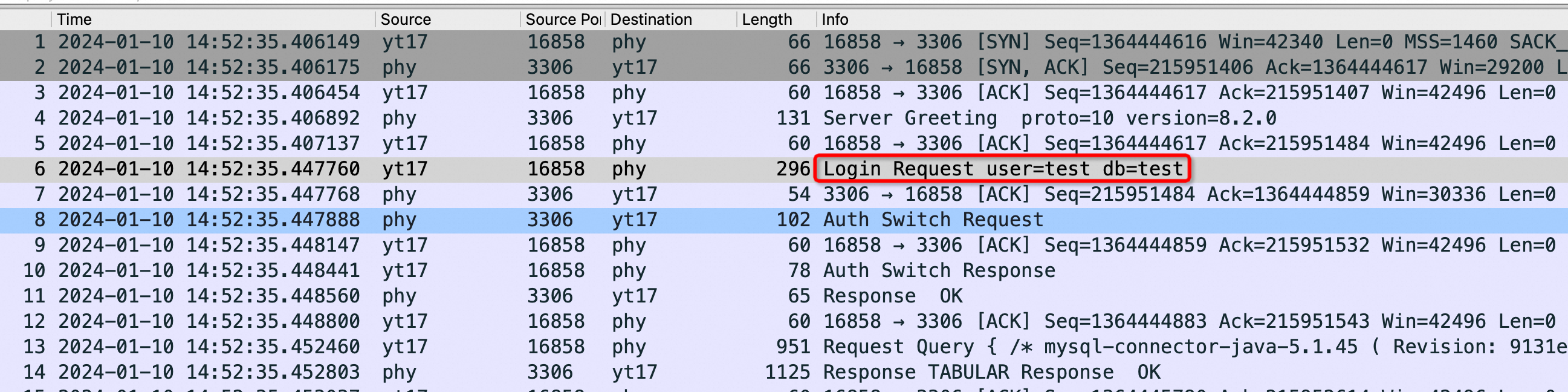
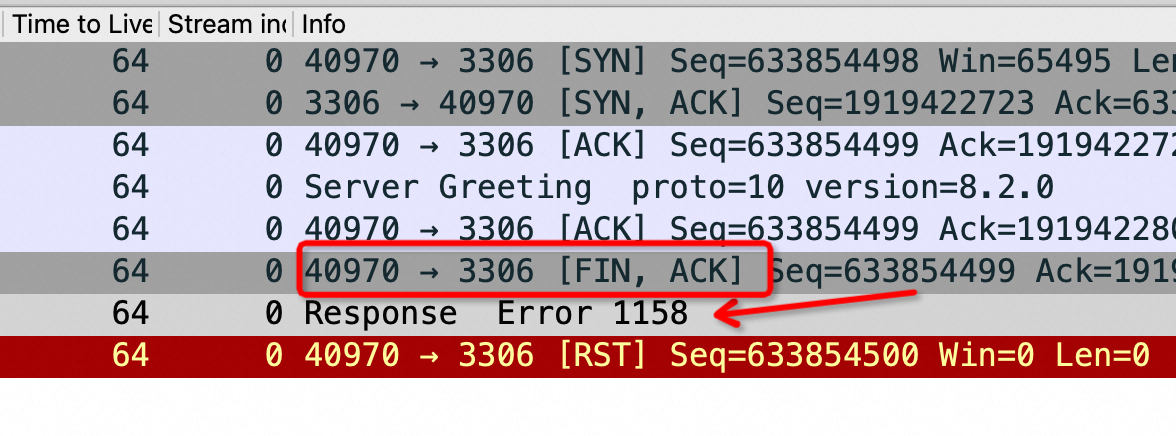
上图是在 Sysbench 所在ECS 上抓包可以看到所有连接都是这样,注意第四个包是 Server端在3次握手成功后发了 Server Greeting 给客户端 Sysbench,此时Sysbench 应该发自己的账号密码来 Login但是抓包永远卡在这里,也就是Sysbench 建立完连接后跑了,不搭理服务端发了什么,这也是为什么最前面的 netstat -anto 看到 Recv-Q 这列总是79,这79长度的内容就是 Server 发给Sysbench 的 Server Greeting 内容,本该Sysbench 去读走 Server Greeting 然后按照MySQL 协议发账号密码,但是不,此时Sysbench 颠了,不管这个连接了,又去创建新连接于是重复上面的过程;直到本地端口用完,sys CPU 干到 100%
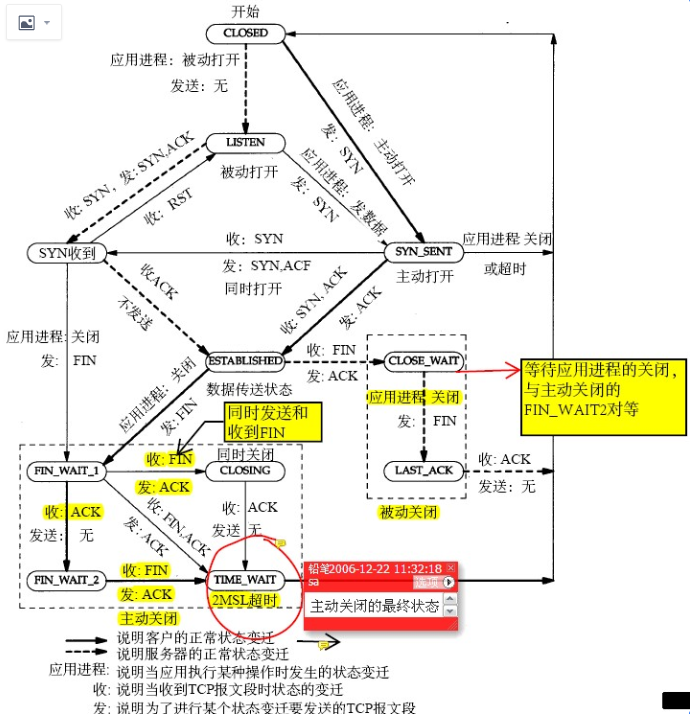
其实上面这个抓包的连接状态是 ESTABLISHED 状态,为什么最终看到的是 CLOSE_WAIT 呢,因为 Server发了 Server Greeting 后有一个超时时间,迟迟等不到Sysbench Client的账号密码就会发 FIN 给Client 端请求断开这个连接,导致Client断的连接状态从 ESTABLISHED 进入 CLOSE_WAIT ,这从上面的 TCP 状态图完全可以推导出来,扩大抓包时间的话会抓到 Server 发过来的 FIN 包
# netstat -anto | head -30 |grep -E "State|:3306 " Proto Recv-Q Send-Q Local Address Foreign Address State Timer tcp 78 0 192.168.0.1:46344 192.168.20.220:3306 ESTABLISHED off (0.00/0/0) tcp 78 0 192.168.0.1:44592 192.168.20.220:3306 ESTABLISHED off (0.00/0/0) tcp 78 0 192.168.0.1:45908 192.168.20.220:3306 ESTABLISHED off (0.00/0/0) tcp 78 0 192.168.0.1:44166 192.168.20.220:3306 ESTABLISHED off (0.00/0/0) tcp 78 0 192.168.0.1:59484 192.168.20.220:3306 ESTABLISHED off (0.00/0/0) tcp 78 0 192.168.0.1:60720 192.168.20.220:3306 ESTABLISHED off (0.00/0/0) tcp 78 0 192.168.0.1:53436 192.168.20.220:3306 ESTABLISHED off (0.00/0/0) tcp 78 0 192.168.0.1:58690 192.168.20.220:3306 ESTABLISHED off (0.00/0/0) tcp 78 0 192.168.0.1:35932 192.168.20.220:3306 ESTABLISHED off (0.00/0/0) tcp 78 0 192.168.0.1:53944 192.168.20.220:3306 ESTABLISHED off (0.00/0/0) tcp 78 0 192.168.0.1:59758 192.168.20.220:3306 ESTABLISHED off (0.00/0/0) tcp 78 0 192.168.0.1:53676 192.168.20.220:3306 ESTABLISHED off (0.00/0/0) tcp 78 0 192.168.0.1:59304 192.168.20.220:3306 ESTABLISHED off (0.00/0/0) tcp 78 0 192.168.0.1:41848 192.168.20.220:3306 ESTABLISHED off (0.00/0/0) tcp 78 0 192.168.0.1:44312 192.168.20.220:3306 ESTABLISHED off (0.00/0/0) tcp 78 0 192.168.0.1:56654 192.168.20.220:3306 ESTABLISHED off (0.00/0/0) tcp 78 0 192.168.0.1:3516 192.168.20.220:3306 ESTABLISHED off (0.00/0/0) tcp 78 0 192.168.0.1:39316 192.168.20.220:3306 ESTABLISHED off (0.00/0/0) tcp 78 0 192.168.0.1:55074 192.168.20.220:3306 ESTABLISHED off (0.00/0/0) tcp 78 0 192.168.0.1:59476 192.168.20.220:3306 ESTABLISHED off (0.00/0/0) tcp 78 0 192.168.0.1:48854 192.168.20.220:3306 ESTABLISHED off (0.00/0/0)
#pstack 1448113 Thread 3 (Thread 0x7f9a0b23c640 (LWP 1448115)): #0 0x00007f9a0b9722bb in connect () from /lib64/libpthread.so.0 #1 0x00007f9a0bb02b00 in pvio_socket_internal_connect (pvio=0x7f99fa5db270, name=0x7f99fc0247c0, namelen=16) at /root/mariadb-connector-c-3.2.6/plugins/pvio/pvio_socket.c:642 #2 0x00007f9a0bb02d76 in pvio_socket_connect_sync_or_async (pvio=0x7f99fa5db270, name=0x7f99fc0247c0, namelen=16) at /root/mariadb-connector-c-3.2.6/plugins/pvio/pvio_socket.c:750 #3 0x00007f9a0bb03499 in pvio_socket_connect (pvio=0x7f99fa5db270, cinfo=0x7f9a0b23b3d0) at /root/mariadb-connector-c-3.2.6/plugins/pvio/pvio_socket.c:919 #4 0x00007f9a0bb15277 in ma_pvio_connect (pvio=0x7f99fa5db270, cinfo=0x7f9a0b23b3d0) at /root/mariadb-connector-c-3.2.6/libmariadb/ma_pvio.c:484 #5 0x00007f9a0bb0b59c in mthd_my_real_connect (mysql=0x7f99fc01ff50, host=0x14e4110 "127.0.0.1", user=0x14e27c0 "root", passwd=0x14e40c0 "123", db=0x14e28f0 "test", port=3306, unix_socket=0x0, client_flag=65536) at /root/mariadb-connector-c-3.2.6/libmariadb/mariadb_lib.c:1462 #6 0x00007f9a0bb0affb in mysql_real_connect (mysql=0x7f99fc01ff50, host=0x14e4110 "127.0.0.1", user=0x14e27c0 "root", passwd=0x14e40c0 "123", db=0x14e28f0 "test", port=3306, unix_socket=0x0, client_flag=65536) at /root/mariadb-connector-c-3.2.6/libmariadb/mariadb_lib.c:1301 #7 0x000000000041b5d0 in mysql_drv_real_connect (db_mysql_con=0x7f99fc01fbf0) at drv_mysql.c:405 #8 0x000000000041cc6c in mysql_drv_reconnect (sb_con=0x0) at drv_mysql.c:815 #9 check_error (sb_con=sb_con@entry=0x7f99fc0210a0, func=func@entry=0x486637 "mysql_drv_query()", query=query@entry=0x7f99fc0207f0 "SELECT c FROM sbtest16 WHERE id=5031", counter=counter@entry=0x7f99fc0210c8) at drv_mysql.c:894 #10 0x000000000041d1d1 in mysql_drv_query (rs=0x7f99fc0210c8, len=<optimized out>, query=0x7f99fc0207f0 "SELECT c FROM sbtest16 WHERE id=5031", sb_conn=<optimized out>) at drv_mysql.c:1071 #11 mysql_drv_query (rs=0x7f99fc0210c8, len=<optimized out>, query=0x7f99fc0207f0 "SELECT c FROM sbtest16 WHERE id=5031", sb_conn=<optimized out>) at drv_mysql.c:1051 #12 mysql_drv_execute (stmt=<optimized out>, rs=<optimized out>) at drv_mysql.c:1040 #13 0x000000000040f32a in db_execute (stmt=0x7f99fc021270) at db_driver.c:517
[root@plantegg 11:25 /root] #mysql -h127.0.0.1 --ssl-mode=DISABLED -uroot -p123 test mysql: [Warning] Using a password on the command line interface can be insecure.
#mysql -h127.0.0.1 --ssl-mode=DISABLED -uroot -p123 test mysql: [Warning] Using a password on the command line interface can be insecure. ERROR 1040 (HY000): Too many connections
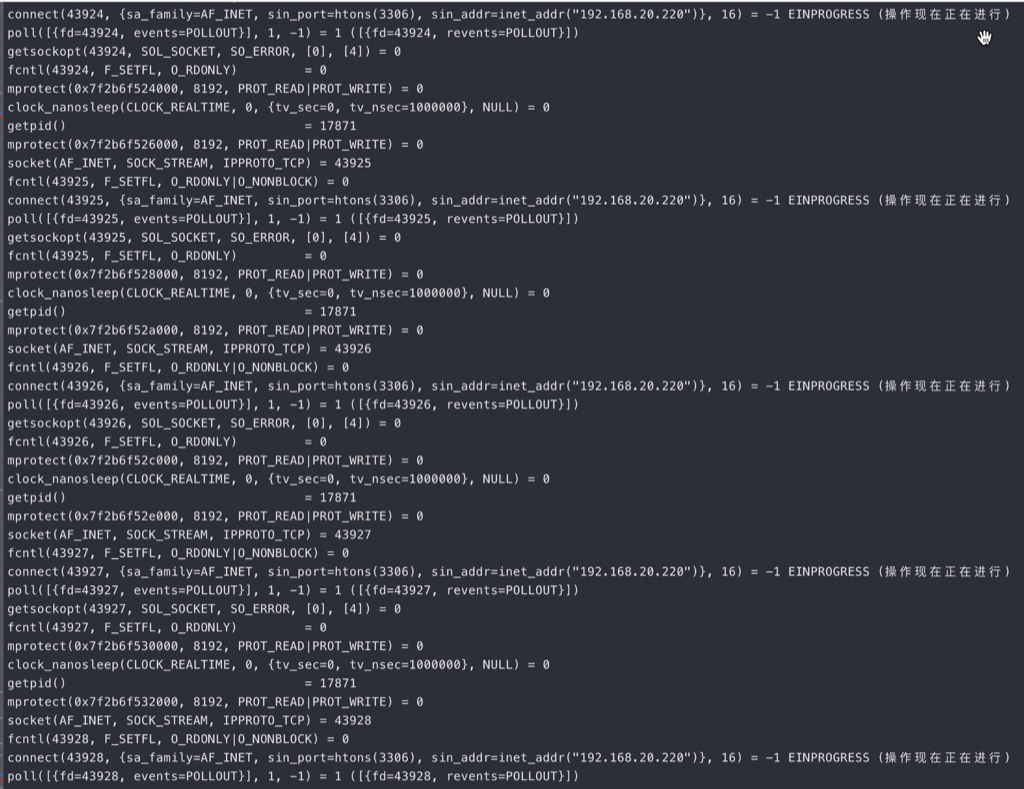
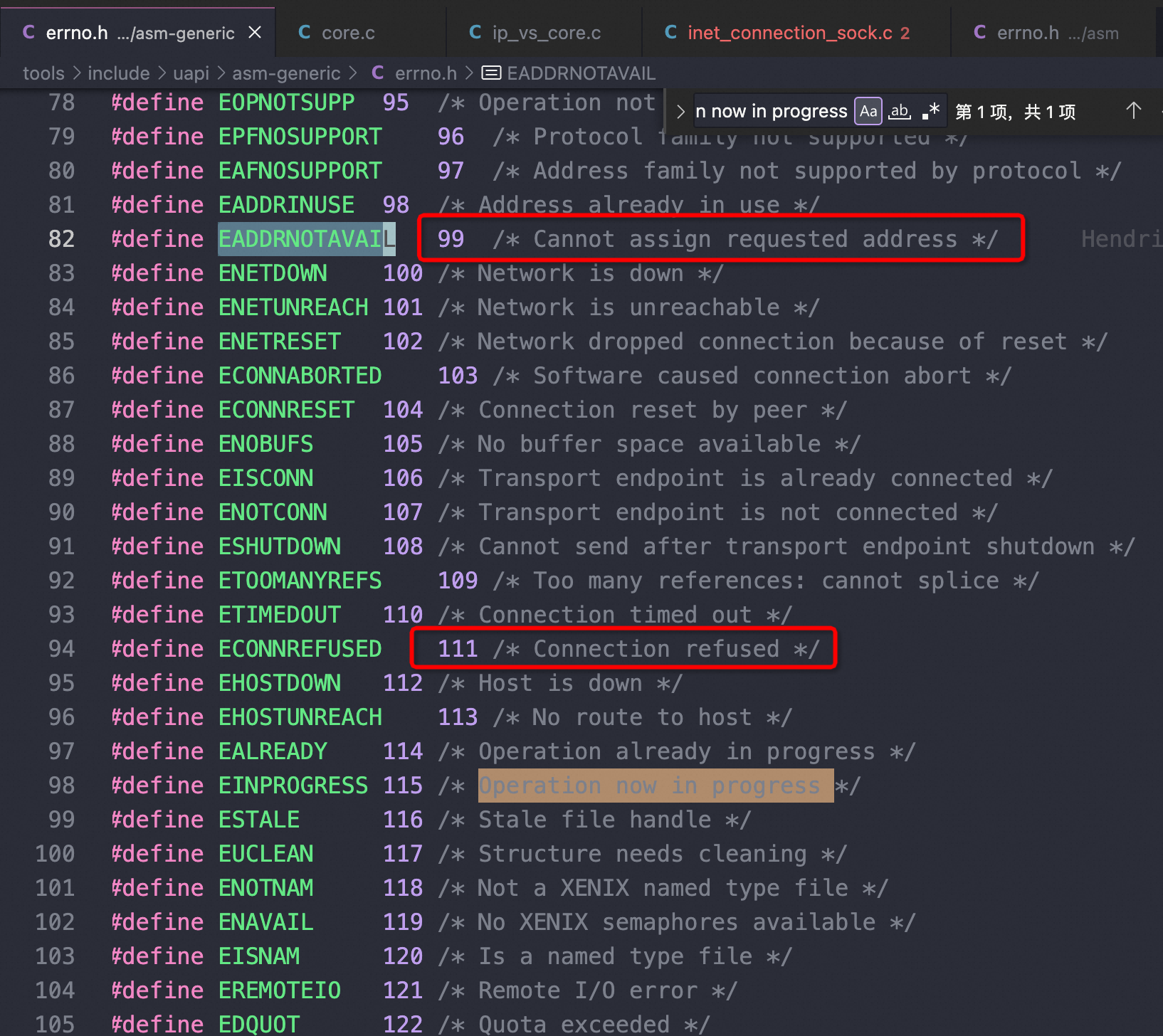
用完端口后: getpid() = 1515928 socket(AF_INET, SOCK_STREAM, IPPROTO_TCP) = 3 connect(3, {sa_family=AF_INET, sin_port=htons(3306), sin_addr=inet_addr("127.0.0.1")}, 16) = -1 EADDRNOTAVAIL (Cannot assign requested address) shutdown(3, SHUT_RDWR) = -1 ENOTCONN (Transport endpoint is not connected) close(3) = 0 fstat(1, {st_mode=S_IFCHR|0620, st_rdev=makedev(0x88, 0), ...}) = 0 write(2, "ERROR 2003 (HY000): ", 20ERROR 2003 (HY000): ) = 20 write(2, "Can't connect to MySQL server on"..., 54Can't connect to MySQL server on '127.0.0.1:3306' (99)) = 54 write(2, "\n", 1 ) = 1 write(1, "\7", 1) = 1 #mysql -h127.0.0.1 --ssl-mode=DISABLED -uroot -p123 test mysql: [Warning] Using a password on the command line interface can be insecure. ERROR 2003 (HY000): Can't connect to MySQL server on '127.0.0.1:3306' (99)
[root@plantegg 11:54 /root] #mysql --show-warnings=FALSE -h127.0.0.1 --ssl-mode=DISABLED -uroot -p123 test mysql: [Warning] Using a password on the command line interface can be insecure. ERROR 2003 (HY000): Can't connect to MySQL server on '127.0.0.1:3306' (111)
账号密码权限错误
1 2
#mysql --show-warnings=FALSE -h127.0.0.1 --ssl-mode=DISABLED -uroot -p1234 test ERROR 1045 (28000): Access denied for user 'root'@'127.0.0.1' (using password: YES)
//正常telnet ,能看到 Greeting以及输密码信息 #telnet 127.0.0.1 3306 Trying 127.0.0.1... Connected to 127.0.0.1. Escape character is '^]'. I 8.2.0�#[6Y @+5=,mi?%#caching_sha2_password^]
//当MySQL-Server 的连接数不够了时 #telnet 127.0.0.1 3306 Trying 127.0.0.1... Connected to 127.0.0.1. Escape character is '^]'. Too many connectionsConnection closed by foreign host.
Caused by: com.mysql.jdbc.exceptions.jdbc4.CommunicationsException: Application was streaming results when the connection failed. Consider raising value of 'net_write_timeout' on the server. at sun.reflect.GeneratedConstructorAccessor150.newInstance(Unknown Source) at sun.reflect.DelegatingConstructorAccessorImpl.newInstance(DelegatingConstructorAccessorImpl.java:45) at java.lang.reflect.Constructor.newInstance(Constructor.java:423) at com.mysql.jdbc.Util.handleNewInstance(Util.java:425) at com.mysql.jdbc.SQLError.createCommunicationsException(SQLError.java:989) at com.mysql.jdbc.MysqlIO.reuseAndReadPacket(MysqlIO.java:3749) at com.mysql.jdbc.MysqlIO.reuseAndReadPacket(MysqlIO.java:3649) at com.mysql.jdbc.MysqlIO.checkErrorPacket(MysqlIO.java:4090) at com.mysql.jdbc.MysqlIO.checkErrorPacket(MysqlIO.java:972) at com.mysql.jdbc.MysqlIO.nextRow(MysqlIO.java:2123) at com.mysql.jdbc.RowDataDynamic.nextRecord(RowDataDynamic.java:374) at com.mysql.jdbc.RowDataDynamic.next(RowDataDynamic.java:354) at com.mysql.jdbc.RowDataDynamic.close(RowDataDynamic.java:155) at com.mysql.jdbc.ResultSetImpl.realClose(ResultSetImpl.java:6726) at com.mysql.jdbc.ResultSetImpl.close(ResultSetImpl.java:865) at com.alibaba.druid.pool.DruidPooledResultSet.close(DruidPooledResultSet.java:86)
The number of seconds to wait for a block to be written to a connection before aborting the write. 只针对执行查询中的等待超时,网络不好,tcp buffer满了(应用迟迟不读走数据)等容易导致mysql server端报net_write_timeout错误,指的是mysql server hang在那里长时间无法发送查询结果。
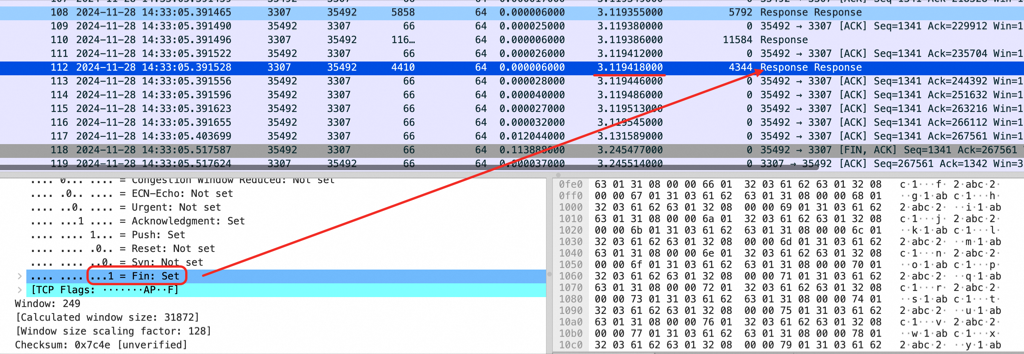
如下图红框所示的地方可以看到MySQL Server 传着传着居然带了个 fin 包在里面,表示MySQL Server要断开连接了,无奈Client只能也发送quit 断开连接。红框告诉我们一个无比有力的证据MySQL Server 在不应该断开的地方断开了连接,问题在 MySQL Server 端
Application was streaming results when the connection failed. Consider raising value of ‘net_write_timeout’ on the server. - com.mysql.jdbc.exceptions.jdbc4.CommunicationsException: Application was streaming results when the connection failed. Consider raising value of ‘net_write_timeout’ on the server.
com.mysql.jdbc.exceptions.jdbc4.CommunicationsException: Application was streaming results when the connection failed. Consider raising value of 'net_write_timeout' on the server. at java.base/jdk.internal.reflect.NativeConstructorAccessorImpl.newInstance0(Native Method) at java.base/jdk.internal.reflect.NativeConstructorAccessorImpl.newInstance(NativeConstructorAccessorImpl.java:77) at java.base/jdk.internal.reflect.DelegatingConstructorAccessorImpl.newInstance(DelegatingConstructorAccessorImpl.java:45) at java.base/java.lang.reflect.Constructor.newInstanceWithCaller(Constructor.java:500) at java.base/java.lang.reflect.Constructor.newInstance(Constructor.java:481) at com.mysql.jdbc.Util.handleNewInstance(Util.java:425) at com.mysql.jdbc.SQLError.createCommunicationsException(SQLError.java:990) at com.mysql.jdbc.MysqlIO.reuseAndReadPacket(MysqlIO.java:3559) at com.mysql.jdbc.MysqlIO.reuseAndReadPacket(MysqlIO.java:3459) at com.mysql.jdbc.MysqlIO.checkErrorPacket(MysqlIO.java:3900) at com.mysql.jdbc.MysqlIO.checkErrorPacket(MysqlIO.java:873) at com.mysql.jdbc.MysqlIO.nextRow(MysqlIO.java:1996) at com.mysql.jdbc.RowDataDynamic.nextRecord(RowDataDynamic.java:374) at com.mysql.jdbc.RowDataDynamic.next(RowDataDynamic.java:354) at com.mysql.jdbc.ResultSetImpl.next(ResultSetImpl.java:6312) at Test.main(Test.java:38) Caused by: java.io.EOFException: Can not read response from server. Expected to read 8 bytes, read 3 bytes before connection was unexpectedly lost. at com.mysql.jdbc.MysqlIO.readFully(MysqlIO.java:3011) at com.mysql.jdbc.MysqlIO.reuseAndReadPacket(MysqlIO.java:3519) ... 8 more
JDBC 驱动对这个错误有如下提示(坑人):
Application was streaming results when the connection failed. Consider raising value of ‘net_write_timeout’ on the server. - com.mysql.jdbc.exceptions.jdbc4.CommunicationsException: Application was streaming results when the connection failed. Consider raising value of ‘net_write_timeout’ on the server.
实验中的一些说明:
netTimeoutForStreamingResults=1 表示设置 net_write_timeout 为 1 秒,客户端会发送 set net_write_timeout=1 给数据库
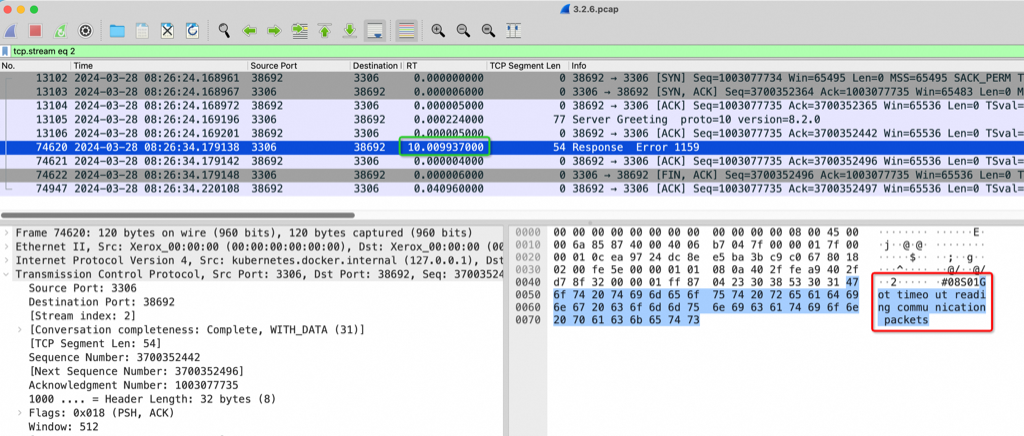
2024-11-28T14:33:03.447397Z 12 [Note] Aborted connection 12 to db: 'test' user: 'root' host: '172.26.137.130' (Got timeout writing communication packets)
此时客户端还慢悠悠地读,RDS 没有回任何错误信息给客户端,客户端读完所有 Response 然后直接读到连接断开就报 Consider raising value of ‘net_write_timeout’ on the server 了,如果客户端读的慢,比如要 10 分钟实际连接在 RDS 上 10 分钟前就进入 fin 了,但是 10 分钟后客户端才报错
long start = System.currentTimeMillis(); ResultSet rs = stmt.executeQuery(sql); int count=0; while (rs.next()) { System.out.println("id:"+rs.getInt("id")+" count:"+count); count++; if(count<3) //1 秒后数据库端连接就已经关闭了,但是因为客户端读得慢,需要不 sleep 后才能读到 fin 然后报错,所以报错可以比实际晚很久 Thread.sleep(1500); } rs.close(); stmt.close(); Thread.sleep(Long.valueOf(interval)); break; } conn.close(); } catch (SQLException e) { e.printStackTrace(); } } }
Consider raising value of ‘net_write_timeout’ 这个报错数据库端不会返回任何错误码给客户端,只是发 fin 断开连接,对客户端来说这条连接是 net_write_timeout 超时了 还是 被kill(或者其他原因) 是没法区分的,所以不管什么原因,只要连接异常 MySQL JDBC Driver 就抛 net_write_timeout 错误
可以将 netTimeoutForStreamingResults 设为 0 或者 100,然后在中途 kill 掉 MySQL 上的 SQL,你也会在客户端看到同样的错误, kill SQL 是在 MySQL 的报错日志中都是同样的:
1
2024-11-28T07:33:12.967012Z 23 [Note] Aborted connection 23 to db: 'test' user: 'root' host: '172.26.137.130' (Got an error writing communication packets)
所以你看一旦客户端出现这个异常堆栈,除了抓包似乎没什么好办法,其实抓包也只能抓到数据库主动发了 fin 什么原因还是不知道,我恨这个没有错误码一统江湖的报错
net_write_timeout 后 RDS 直接发 fin(有时 fin 前面还有一堆 response 包也在排队),然后 rds 日志先报错:2024-11-28T06:33:03.447397Z 12 [Note] Aborted connection 12 to db: ‘test’ user: ‘root’ host: ‘172.26.137.130’ (Got timeout writing communication packets)
客户端慢悠悠地读,RDS 没有传任何错误信息给客户端,客户端读完所有 response 然后直接读到连接断开就报 Consider raising value of ‘net_write_timeout’ on the server 了,如果客户端读的慢,比如要 10 分钟实际连接在 RDS 上 10 分钟前就进入 fin 了,但是 10 分钟后客户端才报错
#netstat -anto |grep -E "Recv|33864|3001|33077" Proto Recv-Q Send-Q Local Address Foreign Address State Timer tcp 0 248 127.0.0.1:33864 127.0.0.1:3001 ESTABLISHED probe (33.48/0/8) tcp6 0 11 127.0.0.1:3307 127.0.0.1:33864 ESTABLISHED on (49.03/13/0)
直到 900多秒后 OS 重试了15次发现都失败,于是向业务/Sysbench 返回连接异常,触发业务/Sysbench 释放异常连接重建新连接,新连接指向了新的 Master 3306,业务恢复正常
1 2 3 4 5 6 7
[ 957s ] thds: 1 tps: 0.00 qps: 0.00 (r/w/o: 0.00/0.00/0.00) lat (ms,95%): 0.00 err/s 0.00 reconn/s: 0.00 DEBUG: Ignoring error 2013 Lost connection to MySQL server during query, DEBUG: Reconnecting DEBUG: Reconnected [ 958s ] thds: 1 tps: 53.00 qps: 950.97 (r/w/o: 741.98/208.99/0.00) lat (ms,95%): 30.26 err/s 0.00 reconn/s: 1.00 [ 959s ] thds: 1 tps: 64.00 qps: 1154.03 (r/w/o: 896.02/258.01/0.00) lat (ms,95%): 22.69 err/s 0.00 reconn/s: 0.00 [ 960s ] thds: 1 tps: 66.00 qps: 1184.93 (r/w/o: 923.94/260.98/0.00) lat (ms,95%): 25.28 err/s 0.00 reconn/s: 0.00
A 长连接 访问B 服务,B服务到A网络不通,假如B发生HA,一般会先Reset/断开B上所有连接(比如 MySQL 会去kill 所有processlist;比如重启MySQL——假如这里的B是MySQL),但是因为网络不通这里的reset、fin网络包都无法到达A,所以B是无法兜底这个异常场景, A无法感知B不可用了,会使用旧连接大约15分钟
最可怕的是 B 服务不响应,B所在的OS 还在响应,那么在A的视角 网络是正常的,这时只能A自己来通过超时兜底
tcp_retries1 - INTEGER This value influences the time, after which TCP decides, that something is wrong due to unacknowledged RTO retransmissions, and reports this suspicion to the network layer. See tcp_retries2 for more details.
RFC 1122 recommends at least 3 retransmissions, which is the default.
tcp_retries2 - INTEGER This value influences the timeout of an alive TCP connection, when RTO retransmissions remain unacknowledged. Given a value of N, a hypothetical TCP connection following exponential backoff with an initial RTO of TCP_RTO_MIN would retransmit N times before killing the connection at the (N+1)th RTO.
The default value of 15 yields a hypothetical timeout of 924.6 seconds and is a lower bound for the effective timeout. TCP will effectively time out at the first RTO which exceeds the hypothetical timeout.
RFC 1122 recommends at least 100 seconds for the timeout, which corresponds to a value of at least 8.
#./mlc Intel(R) Memory Latency Checker - v3.9 Measuring idle latencies (in ns)... Numa node Numa node 0 0 145.8 //多次测试稳定都是145纳秒
Measuring Peak Injection Memory Bandwidths for the system Bandwidths are in MB/sec (1 MB/sec = 1,000,000 Bytes/sec) Using all the threads from each core if Hyper-threading is enabled Using traffic with the following read-write ratios ALL Reads : 110598.7 3:1 Reads-Writes : 93408.5 2:1 Reads-Writes : 89249.5 1:1 Reads-Writes : 64137.3 Stream-triad like: 77310.4
Measuring Memory Bandwidths between nodes within system Bandwidths are in MB/sec (1 MB/sec = 1,000,000 Bytes/sec) Using all the threads from each core if Hyper-threading is enabled Using Read-only traffic type Numa node Numa node 0 0 110598.4
Measuring Loaded Latencies for the system Using all the threads from each core if Hyper-threading is enabled Using Read-only traffic type Inject Latency Bandwidth Delay (ns) MB/sec ========================== 00000 506.00 111483.5 00002 505.74 112576.9 00008 505.87 112644.3 00015 508.96 112643.6 00050 574.36 112701.5
当两个参数都为 on 时的mlc 测试结果:
1 2 3 4 5 6 7 8 9 10 11 12 13 14 15 16 17
#./mlc
Intel(R) Memory Latency Checker - v3.9
Measuring idle latencies (in ns)...
    Numa node
Numa node    0     1
    0    81.6   145.9
    1   144.9    81.2

Measuring Peak Injection Memory Bandwidths for the system
Bandwidths are in MB/sec (1 MB/sec = 1,000,000 Bytes/sec)
Using all the threads from each core if Hyper-threading is enabled
Using traffic with the following read-write ratios
ALL Reads     :  227204.2
3:1 Reads-Writes :  212432.5
2:1 Reads-Writes :  210423.3
1:1 Reads-Writes :  196677.2
Stream-triad like:  189691.4





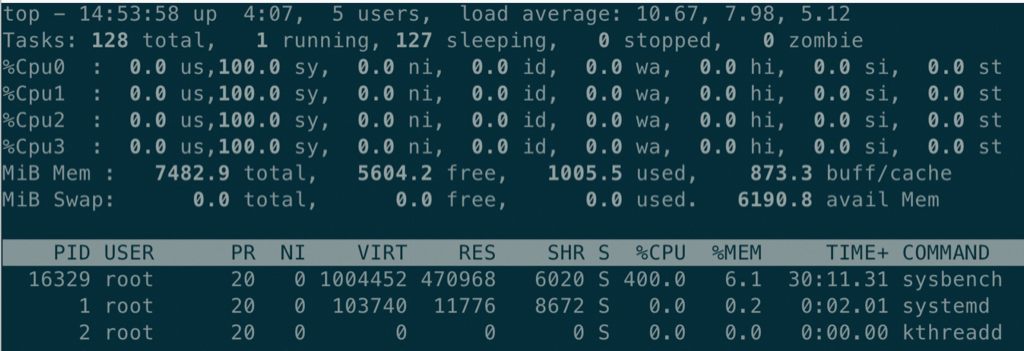
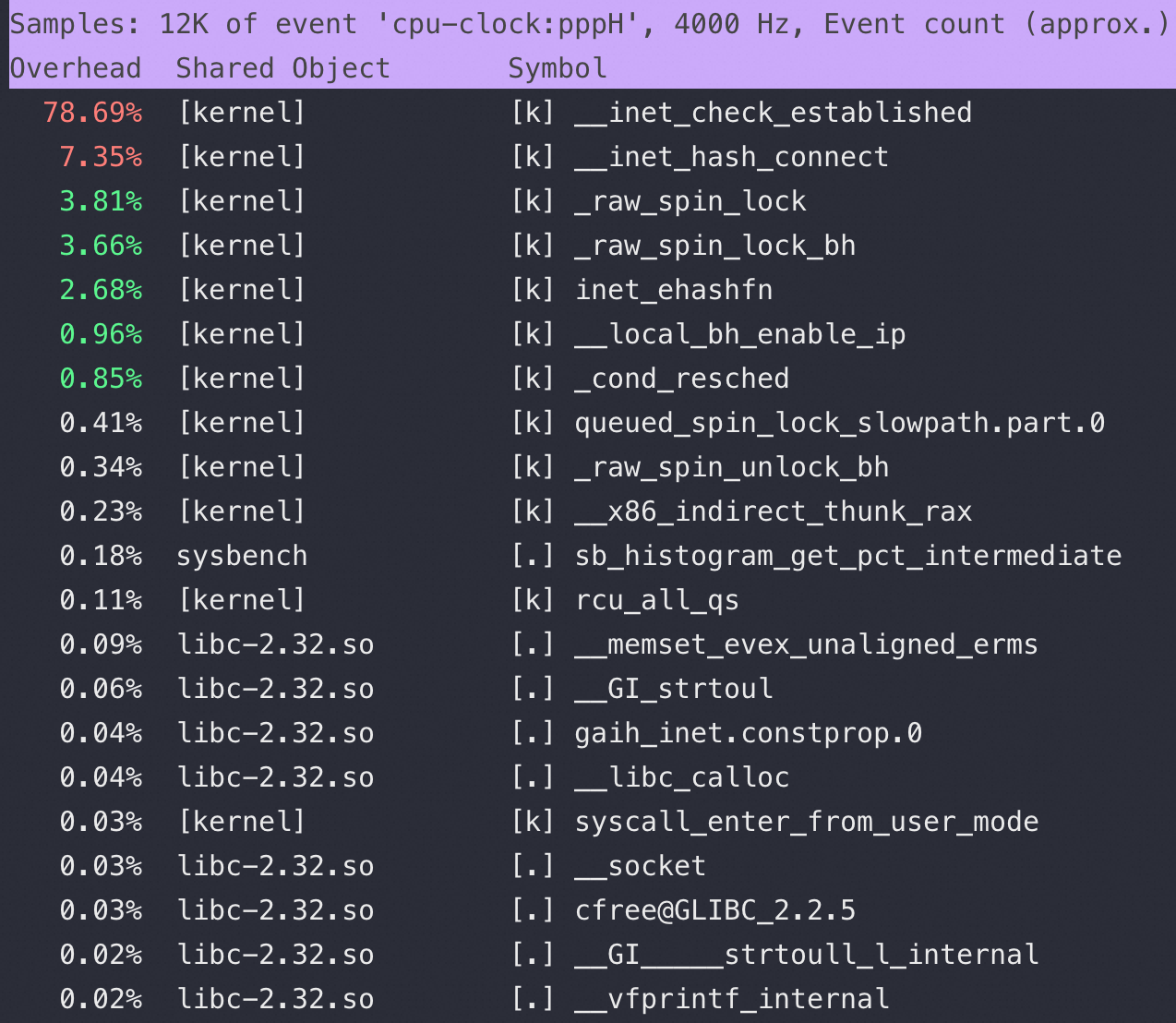
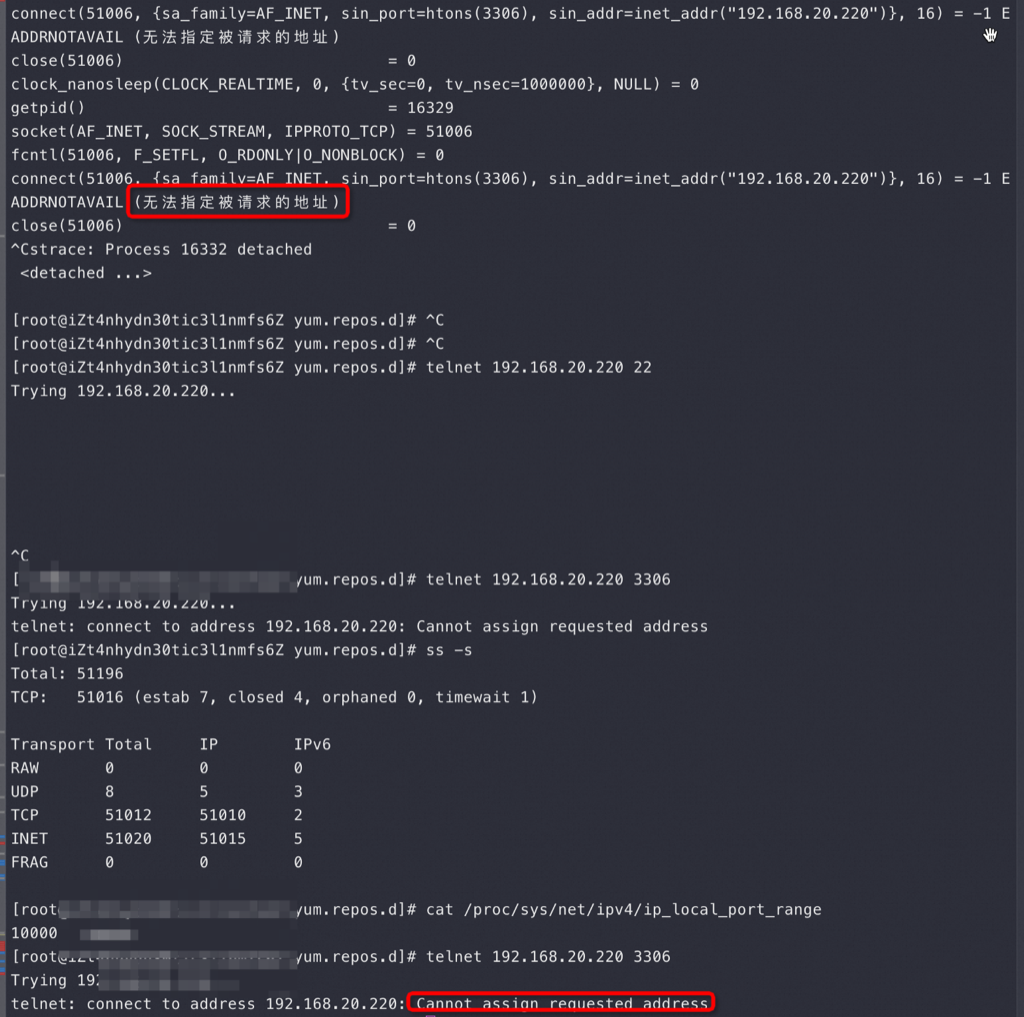
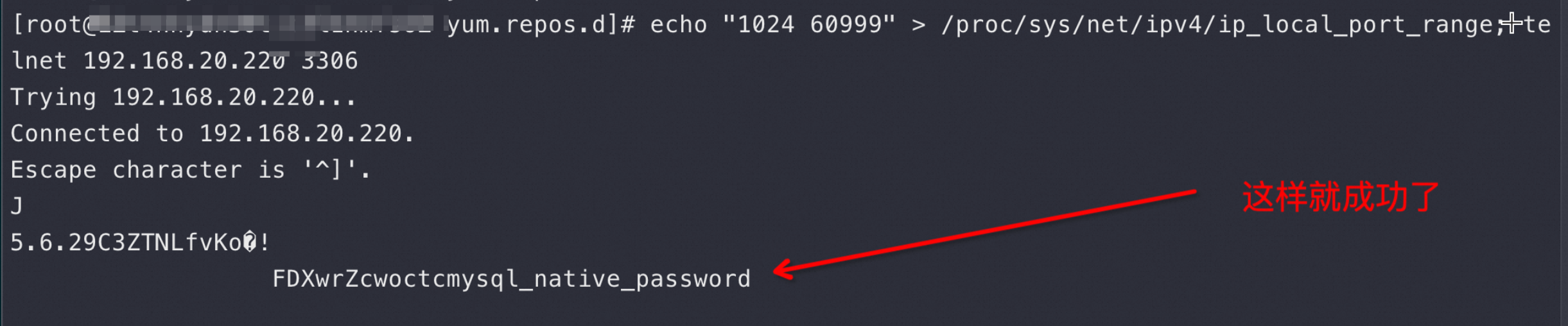
 上图是在 Sysbench 所在ECS 上抓包可以看到所有连接都是这样,注意第四个包是 Server端在3次握手成功后发了 Server Greeting 给客户端 Sysbench,此时Sysbench 应该发自己的账号密码来 Login但是抓包永远卡在这里,也就是Sysbench 建立完连接后跑了,不搭理服务端发了什么,这也是为什么最前面的 netstat -anto 看到 Recv-Q 这列总是79,这79长度的内容就是 Server 发给Sysbench 的 Server Greeting 内容,本该Sysbench 去读走 Server Greeting 然后按照MySQL 协议发账号密码,但是不,此时Sysbench 颠了,不管这个连接了,又去创建新连接于是重复上面的过程;直到本地端口用完,sys CPU 干到 100%