Intel PAUSE指令变化是如何影响自旋锁以及MySQL的性能的
Intel PAUSE指令变化如何影响MySQL的性能
导读
x86、arm指令都很多,无论是应用程序员还是数据库内核研发大多时候都不需要对这些指令深入理解,但是 Pause 指令和数据库操作太紧密了,本文通过一次非常有趣的性能优化来引入对 Pause 指令的理解,期望可以事半功倍地搞清楚 CPU指令集是如何影响你的程序的。
文章分成两大部分,第一部分是 MySQL 集群的一次全表扫描性能优化过程; 第二部分是问题解决后的原理分析以及Pause指令的来龙去脉和优缺点以及应用场景分析。
业务结构
为理解方便做了部分简化:
client -> Tomcat -> LVS -> MySQL(32 个 MySQLD实例集群,每个实例8Core)
场景描述
业务按照 个人分库+单位分表: 32个RDS * 8个分库 * 4张分表=1024分表, 也就是 256个分库,每个分库4张表
通过 client 压 Tomcat 和 MySQL 集群(对数据做分库分表),MySQL 集群是32个实例,每个业务 SQL 都需要经过 Tomcat 拆分成 256 个 SQL 发送给 32 个MySQL 实例(每个MySQL 实例上有8个分库),这 256 条下发给 MySQL 的 SQL 不是完全串行,但也不是完全并行,有一定的并行性。
业务 SQL 如下是一个简单的select sum求和,这个 SQL在每个MySQL上都很快(有索引)
SELECT SUM(emp_arr_amt) FROM table_c WHERE INSUTYPE='310' AND Revs_Flag='Z' AND accrym='201910' AND emp_no='1050457';
监控指标说明
- 后述或者截图中的逻辑RT/QPS是指 client 上看到的Tomcat的 RT 和 QPS;
- RT :response time 请求响应时间,判断性能瓶颈的唯一指标;
- 物理RT/QPS是指Tomcat看到的MySQL RT 和QPS(这里的 RT 是指到达Tomcat节点网卡的 RT ,所以还包含了网络消耗)
问题描述:
通过client压一个Tomcat节点+32个MySQL,QPS大概是430,Tomcat节点CPU跑满,MySQL RT 是0.5ms,增加一个Tomcat节点,QPS大概是700,Tomcat CPU接近跑满,MySQL RT 是0.6ms,到这里性能基本随着扩容线性增加,是符合预期的。
继续增加Tomcat节点来横向扩容性能,通过client压三个Tomcat节点+32个MySQL,QPS还是700,Tomcat节点CPU跑不满,MySQL RT 是0.8ms,这就严重不符合预期了。
性能压测原则:
加并发QPS不再上升说明到了某个瓶颈,哪个环节RT增加最多瓶颈就在哪里
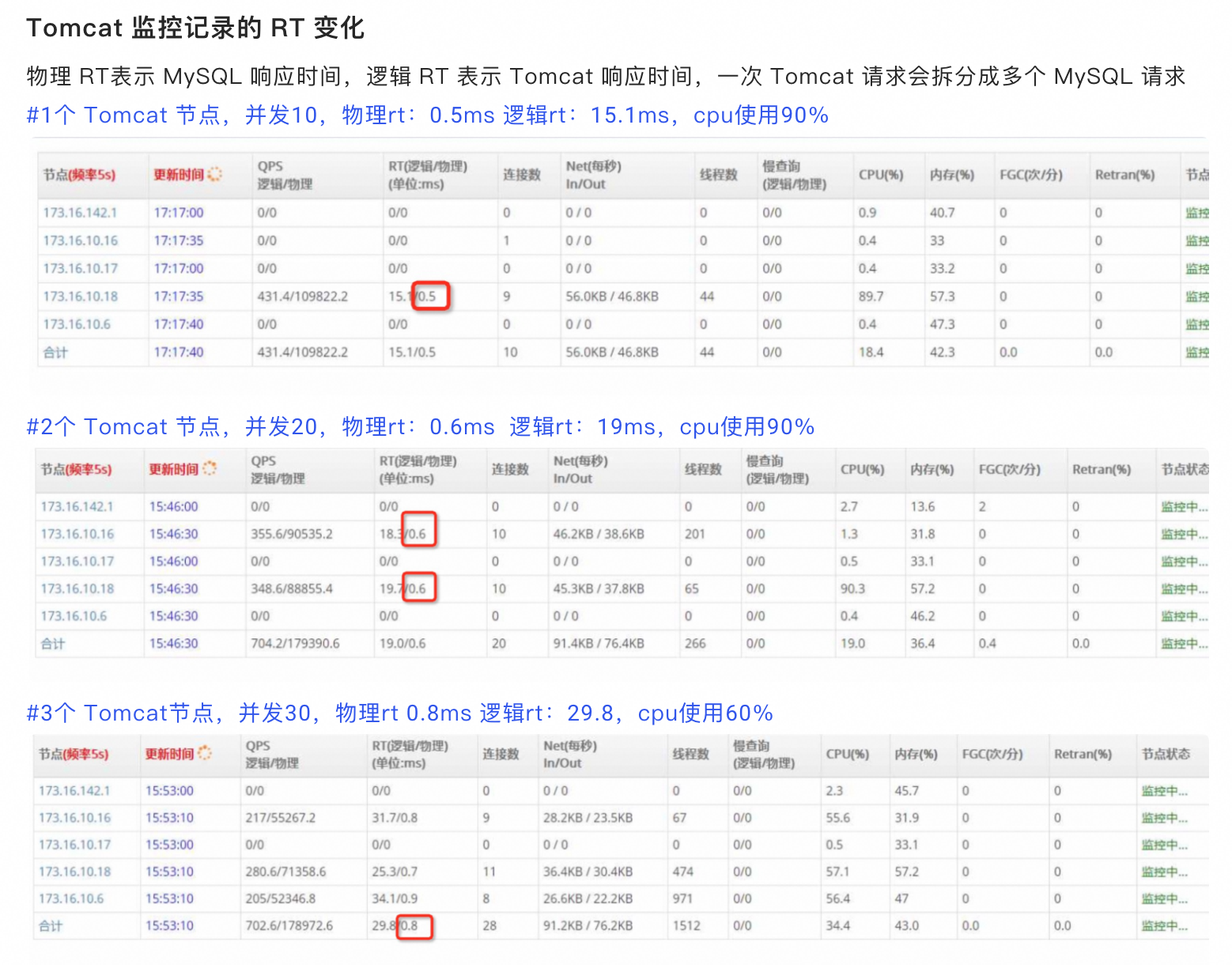
到这里一切都还是符合我们的经验的,看起来就是 MySQL 有瓶颈(RT 增加明显)。
排查 MySQL
现场DBA通过监控看到MySQL CPU不到20%,没有慢查询,并且尝试用client越过所有中间环节直接压其中一个MySQL,可以将 MySQL CPU 跑满,这时的QPS大概是38000(对应上面的场景client QPS为700的时候,单个MySQL上的QPS才跑到6000) 所以排除了MySQL的嫌疑(这个推理不够严谨为后面排查埋下了大坑)。
那么接下来的嫌疑在网络、LVS 等中间环节上。
LVS和网络的嫌疑
首先通过大查询排除了带宽的问题,因为这里都是小包,pps到了72万,很自然想到了网关、LVS的限流之类的
pps监控,这台物理机有4个MySQL实例上,pps 9万左右,9*32/4=72万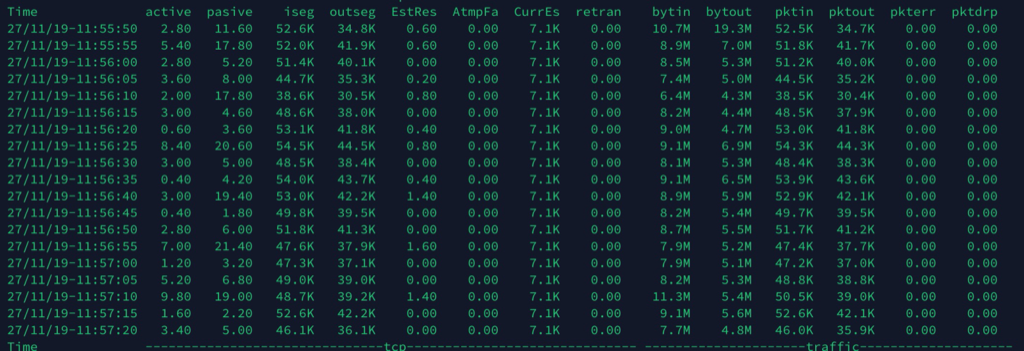
…………(省略巨长的分析、拉人、扯皮过程)
最终所有网络因素都被排除,核心证据是:做压测的时候反复从 Tomcat 上 ping 后面的MySQL,RT 跟没有压力的时候一样,也说明了网络没有问题(请思考这个 ping 的作用)。
问题的确认
尝试在Tomcat上打开日志,并将慢 SQL 阈值设置为100ms,这个时候确实能从日志中看到大量MySQL上的慢查询,因为这个SQL需要在Tomcat上做拆分成256个SQL,同时下发,一旦有一个SQL返回慢,整个请求就因为这个短板被拖累了。平均 RT 0.8ms,但是经常有超过100ms的话对整体影响还是很大的。
将Tomcat记录下来的慢查询(Tomcat增加了一个唯一id下发给MySQL)到MySQL日志中查找,果然发现MySQL上确实慢了,所以到这里基本确认是MySQL的问题,终于不用再纠结是否是网络问题了。
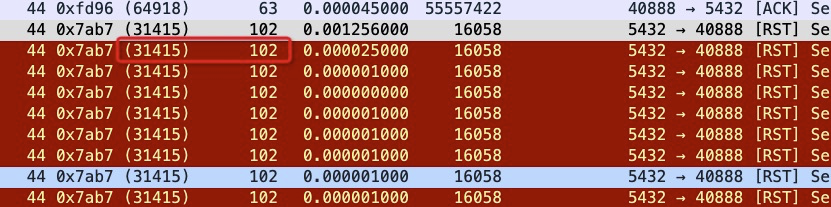
同时在Tomcat进行抓包,对网卡上的 RT 进行统计分析:

上是Tomcat上抓到的每个sql的物理RT 平均值,上面是QPS 430的时候, RT 0.6ms,下面是3个server,QPS为700,但是 RT 上升到了0.9ms,基本跟Tomcat监控记录到的物理RT一致。如果MySQL上也有类似抓包计算 RT 时间的话可以快速排除网络问题。
网络抓包得到的 RT 数据更容易被所有人接受。尝试过在MySQL上抓包,但是因为LVS模块的原因,进出端口、ip都被修改过,所以没法分析一个流的响应时间。
重心再次转向MySQL
这个时候因为问题点基本确认,再去查看MySQL是否有问题的重心都不一样了,不再只是看看CPU和慢查询,这个问题明显更复杂一些。
教训:CPU只是影响性能的一个因素,RT 才是结果,要追着 RT 跑,而不是只看 CPU
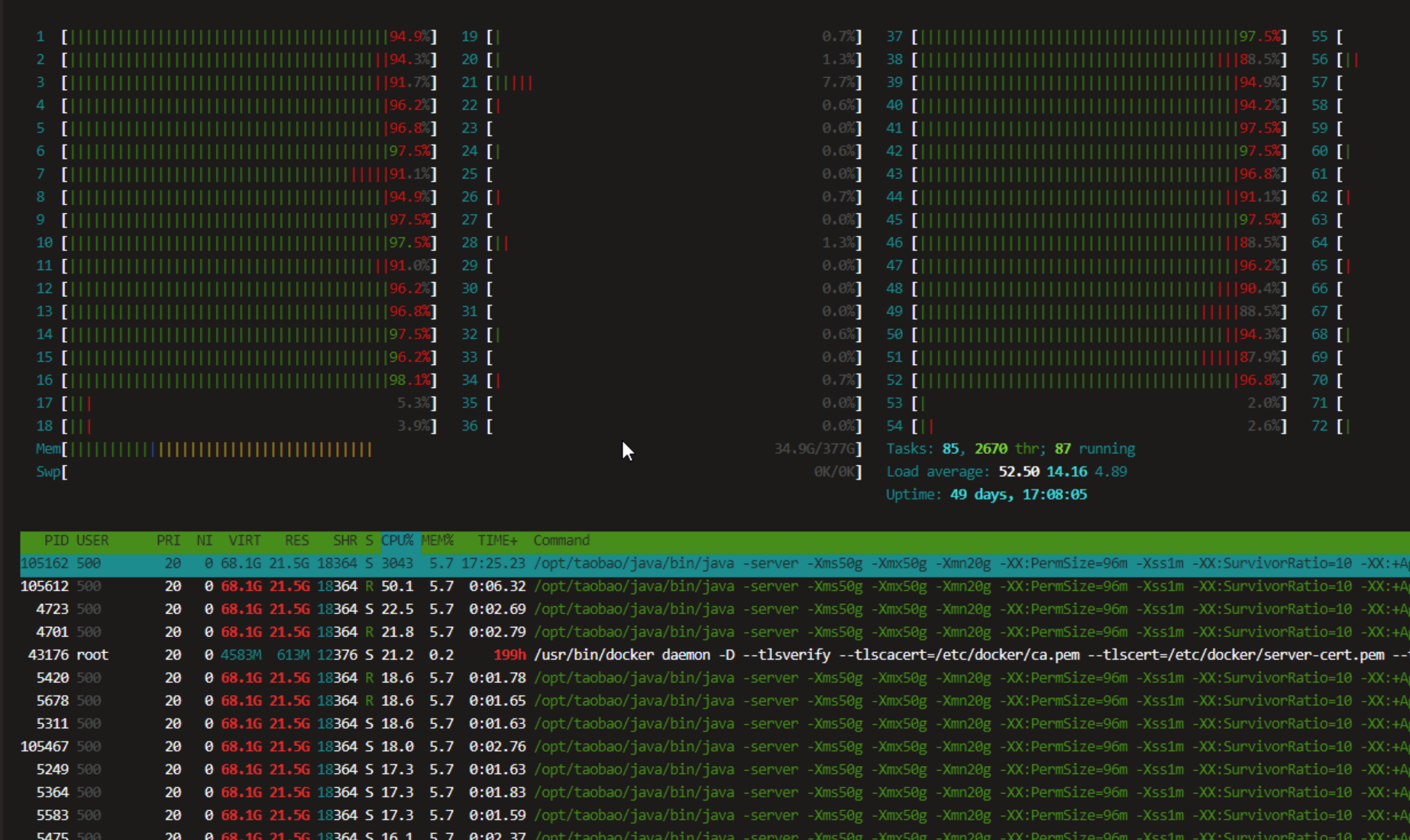
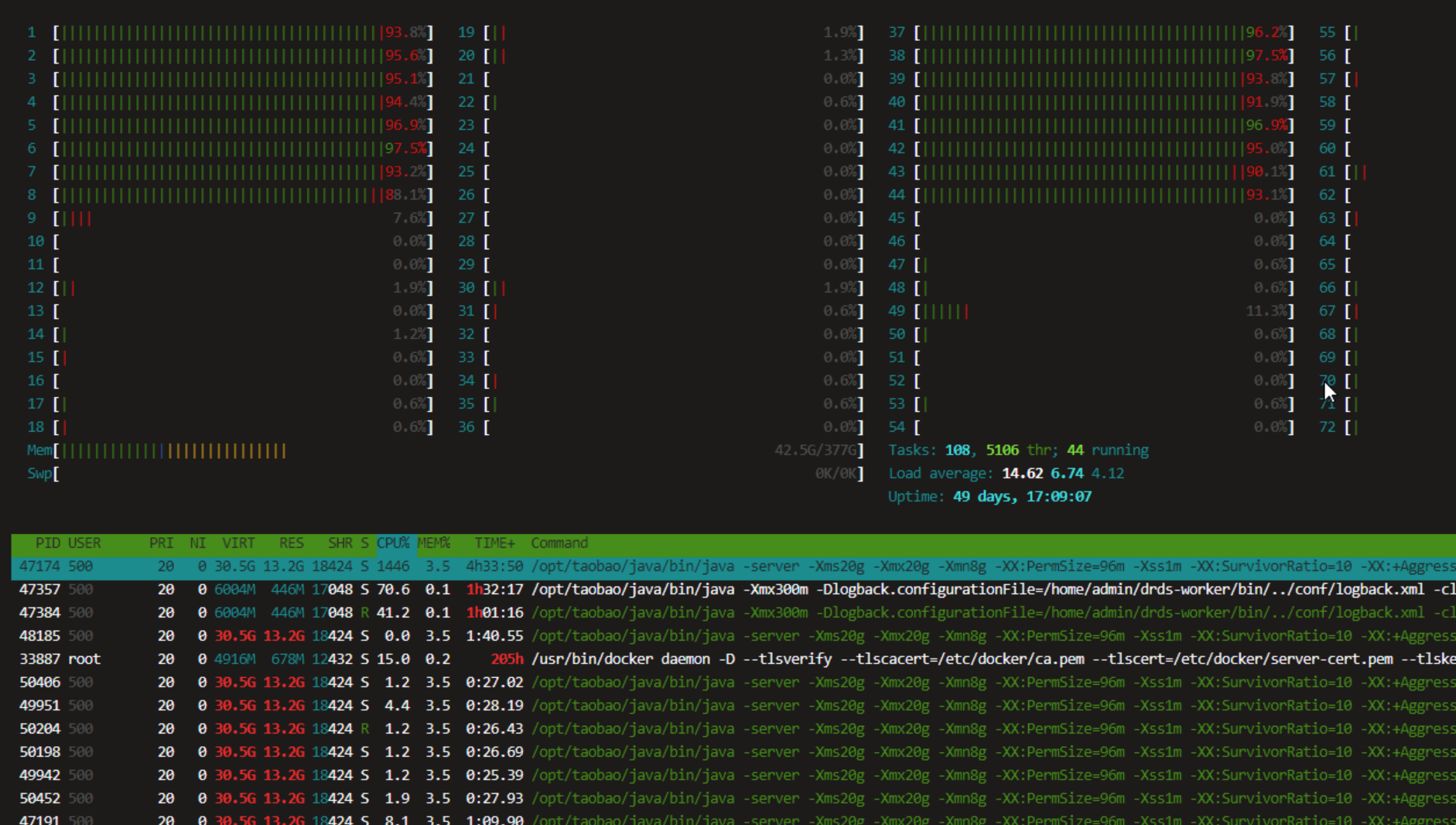
通过监控发现MySQL CPU虽然一直不高,但是经常看到running thread飙到100多,很快又降下去了,看起来像是突发性的并发查询请求太多导致了排队等待,每个MySQL实例是8Core的CPU,尝试将MySQL实例扩容到16Core(只是为了验证这个问题),QPS确实可以上升到1000(没有到达理想的1400)。
这是Tomcat上监控到的MySQL状态: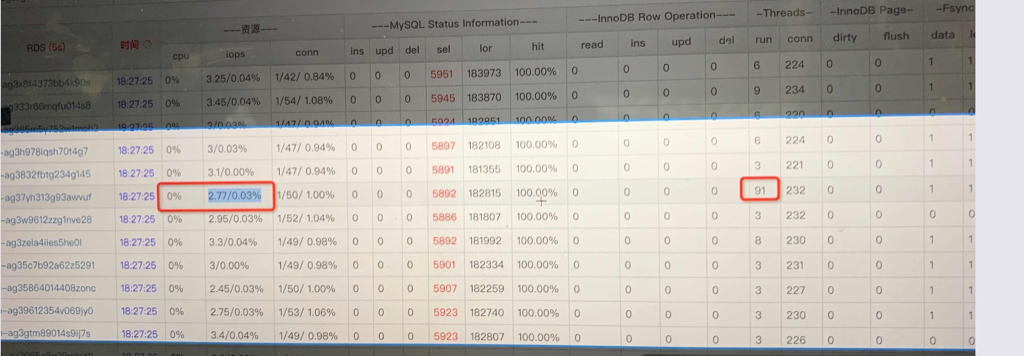
同时在MySQL机器上通过vmstat也可以看到这种飙升: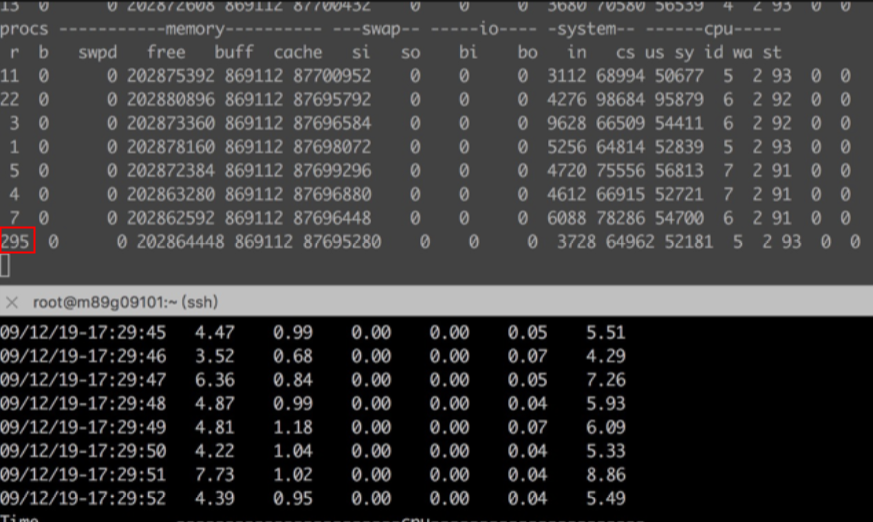
以上分析可以清晰看到虽然 MySQL 整体压力不大,但是似乎会偶尔来一波卡顿、running 任务飙升。
像这种短暂突发性的并发流量似乎监控都很难看到(基本都被平均掉了),只有一些实时性监控偶尔会采集到这种短暂突发性飙升,这也导致了一开始忽视了MySQL。
所以接下来的核心问题就是MySQL为什么会有这种飙升、这种飙升的影响到底是什么?
perf top
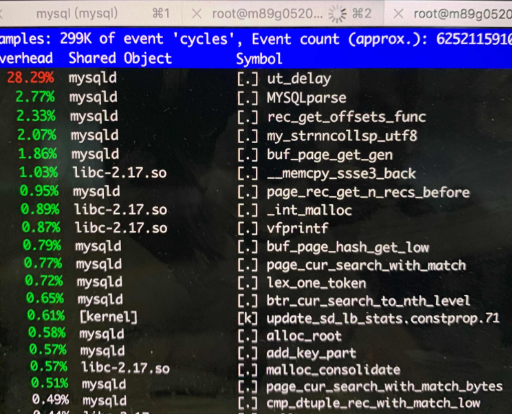
直接用 perf 看下 MySQLD 进程,发现 ut_delay 高得不符合逻辑:
展开看一下,基本是在优化器中做索引命中行数的选择:
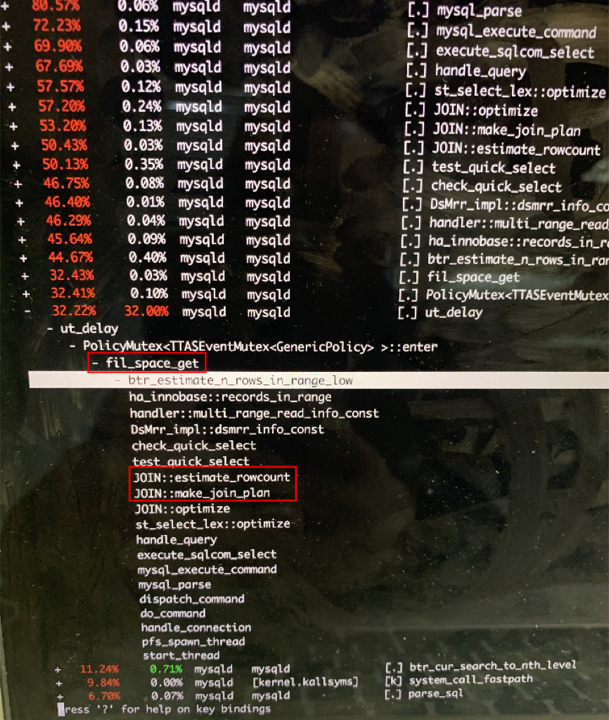
跟直接在 MySQL 命令行中通过 show processlist看到的基本一致:
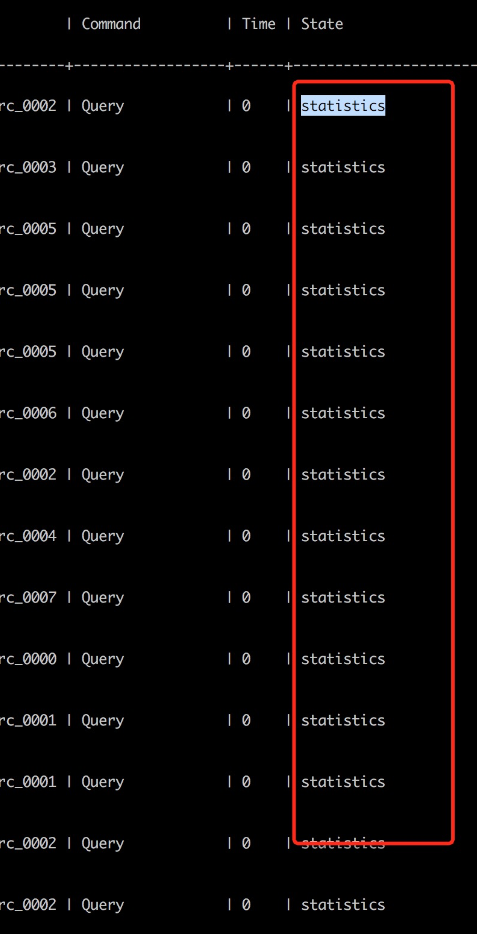
这是 MySQL 的优化器在对索引进行统计,统计的时候要加锁,thread running 抖动的时候通过 show processlist 看到很多 thread处于 statistics 状态。也就是高并发下加锁影响了 CPU 压不上去同时 RT 剧烈增加。
这里ut_delay 消耗了 28% 的 CPU 肯定太不正常了,于是将 innodb_spin_wait_delay 从 30 改成 6 后性能立即上去了,继续增加 Tomcat 节点,QPS也可以线性增加。
耗CPU最高的调用函数栈是…
mutex_spin_wait->ut_delay,属于锁等待的逻辑。InnoDB在这里用的是自旋锁,锁等待是通过调用 ut_delay 让 CPU做空循环在等锁的时候不释放CPU从而避免上下文切换,会消耗比较高的CPU。
最终的性能
调整参数 innodb_spin_wait_delay=6 后在4个Tomcat节点下,并发40时,QPS跑到了1700,物理RT:0.7,逻辑RT:19.6,cpu:90%,这个时候只需要继续扩容 Tomcat 节点的数量就可以增加QPS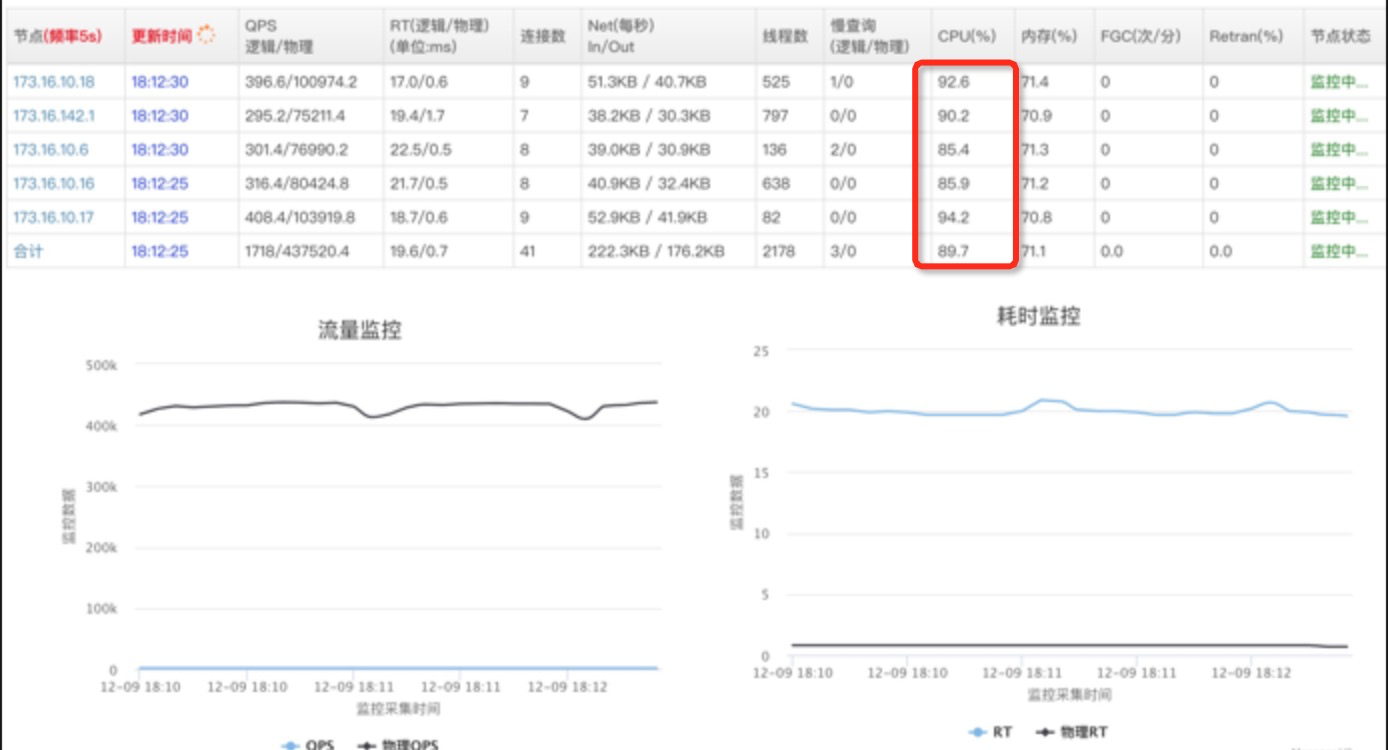
再跟调整前比较一下,innodb_spin_wait_delay=30,并发40时,QPS 500+,物理RT:2.6ms 逻辑RT:72.1ms cpu:37%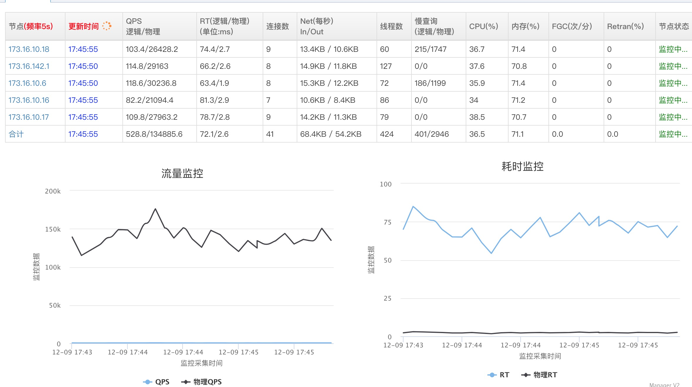
再看看调整前压测的时候的vmstat和tsar –cpu,可以看到process running抖动明显
对比修改delay后的process running就很稳定了,即使QPS大了3倍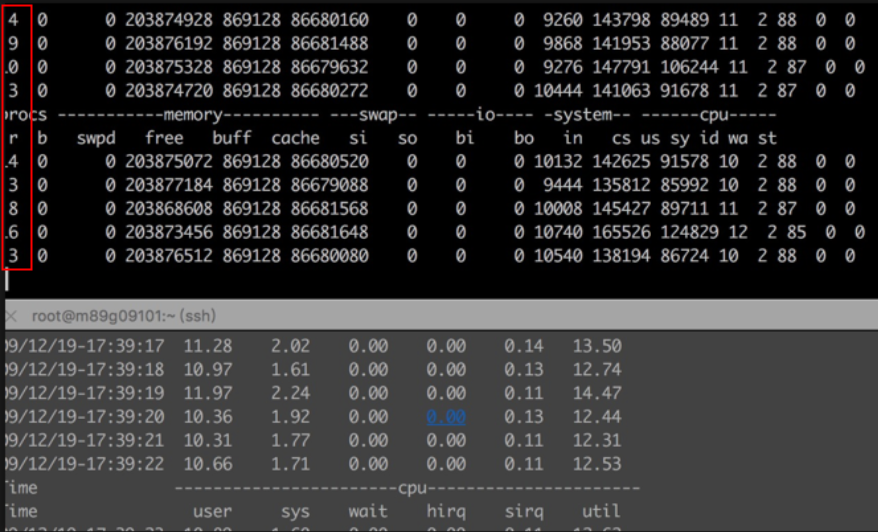
事后思考和分析
到这里问题得到了完美解决,但是不禁要问为什么?ut_delay 是怎么工作的? 和 innodb_spin_wait_delay 以及自旋锁的关系?
原理解析
既然调整 innodb_spin_wait_delay 就能解决这个问题,那就要先分析一下 innodb_spin_wait_delay 的作用
关于 innodb_spin_wait_delay
innodb通过大量的自旋锁(比如 InnoDB mutexes and rw-locks)来用高CPU消耗避免上下文切换,这是自旋锁的正确使用方式,在多核场景下,它们一起自旋抢同一个锁,容易造成cache ping-pong,进而多个CPU核之间会互相使对方缓存部分无效。所以这里innodb通过增加 innodb_spin_wait_delay 和 Pause 配合来缓解cache ping-pong,也就是本来通过CPU 高速自旋抢锁,换成了抢锁失败后 delay一下(Pause)但是不释放CPU,delay 时间到后继续抢锁,也就是把连续的自旋抢锁转换成了更稀疏的点状的抢锁(间隔的 delay是个随机数),这样不但避免了上下文切换也大大减少了cache ping-pong。
自旋锁如何减少了cache ping-pong
多线程竞争锁的时候,加锁失败的线程会“忙等待”,直到它拿到锁。什么叫“忙等待”呢?它并不意味着一直执行 CAS 函数,而是会与 CPU 紧密配合 ,它通过 CPU 提供的 PAUSE 指令,减少循环等待时的cache ping-pong和耗电量;对于单核 CPU,忙等待并没有意义,此时它会主动把线程休眠。
X86 PAUSE 指令
X86设计了Pause指令,也就是调用 Pause 指令的代码会抢着 CPU 不释放,但是CPU 会打个盹,比如 10个时钟周期,相对一次上下文切换是大几千个时钟周期。
这样应用一旦自旋抢锁失败可以先 Pause 一下,只是这个Pause 时间对于 MySQL 来说还不够久,所以需要增加参数 innodb_spin_wait_delay 来将休息时间放大一些。
在我们的这个场景下对每个 SQL的 RT 抖动非常敏感(放大256倍),所以过高的 delay 会导致部分SQL RT 变高。
函数 ut_delay(ut_rnd_interval(0, srv_spin_wait_delay)) 用来执行这个delay:
/***************************MySQL代码****************************/
/**Runs an idle loop on CPU. The argument gives the desired delay
in microseconds on 100 MHz Pentium + Visual C++.
@return dummy value */
UNIV_INTERN
ulint
ut_delay(ulint delay)  //delay 是[0,innodb_spin_wait_delay)之间的一个随机数
{
        ulint   i, j;
        UT_LOW_PRIORITY_CPU();
        j = 0;

        for (i = 0; i < delay * 50; i++) {  //delay 放大50倍
                j += i;
                UT_RELAX_CPU();             //调用 CPU Pause
        }

        UT_RESUME_PRIORITY_CPU();
        return(j);
}
innodb_spin_wait_delay的默认值为6. spin 等待延迟是一个动态全局参数,可以在MySQL选项文件(my.cnf或my.ini)中指定该参数,或者在运行时使用SET GLOBAL 来修改。在我们的MySQL配置中默认改成了30,导致了这个问题。
CPU 为什么要有Pause
首先可以看到 Pause 指令的作用:
- 避免上下文切换,应用层想要休息可能会用yield、sleep,这两操作对于CPU来说太重了(伴随上下文切换)
- 能给超线程腾出计算能力(HT共享核,但是有单独的寄存器等存储单元,CPU Pause的时候,对应的HT可以占用计算资源),比如同一个core上先跑多个Pause,同时再跑 nop 指令,这时 nop指令的 IPC基本不受Pause的影响
- 节能(CPU可以休息、但是不让出来),CPU Pause 的时候你从 top 能看到 CPU 100%,但是不耗能。
所以有了 Pause 指令后能够提高超线程的利用率,节能,减少上下文切换提高自旋锁的效率。
The PAUSE instruction is first introduced for Intel Pentium 4 processor to improve the performance of “spin-wait loop”. The PAUSE instruction is typically used with software threads executing on two logical processors located in the same processor core, waiting for a lock to be released. Such short wait loops tend to last between tens and a few hundreds of cycles. When the wait loop is expected to last for thousands of cycles or more, it is preferable to yield to the operating system by calling one of the OS synchronization API functions, such as WaitForSingleObject on Windows OS.
An Intel® processor suffers a severe performance penalty when exiting the loop because it detects a possible memory order violation. The PAUSE instruction provides a hint to the processor that the code sequence is a spin-wait loop. The processor uses this hint to avoid the memory order violation in most situations. The PAUSE instruction can improve the performance of the processors supporting Intel Hyper-Threading Technology when executing “spin-wait loops”. With Pause instruction, processors are able to avoid the memory order violation and pipeline flush, and reduce power consumption through pipeline stall.
从intel sdm手册以及实际测试验证来看,Pause 指令在执行过程中,基本不占用流水线执行资源。
Skylake 架构的8163 和 Broadwell架构 E5-2682 CPU型号的不同
为什么用得好好的 innodb_spin_wait_delay 参数这次就不行了呢?
这是因为以前业务一直使用的是 E5-2682 CPU,这次用的是新一代架构的 Skylake 8163,那这两款CPU在这里的核心差别是?
在Intel 64-ia-32-architectures-optimization-manual手册中提到:
The latency of the PAUSE instruction in prior generation microarchitectures is about 10 cycles, whereas in Skylake microarchitecture it has been extended to as many as 140 cycles.
The PAUSE instruction can improves the performance of processors supporting Intel Hyper-Threading Technology when executing “spin-wait loops” and other routines where one thread is accessing a shared lock or semaphore in a tight polling loop. When executing a spin-wait loop, the processor can suffer a severe performance penalty when exiting the loop because it detects a possible memory order violation and flushes the core processor’s pipeline. The PAUSE instruction provides a hint to the processor that the code sequence is a spin-wait loop. The processor uses this hint to avoid the memory order violation and prevent the pipeline flush. In addition, the PAUSE instruction de-
pipelines the spin-wait loop to prevent it from consuming execution resources excessively and consume power needlessly. (See Section 8.10.6.1, “Use the PAUSE Instruction in Spin-Wait Loops,” for more information about using the PAUSE instruction with IA-32 processors supporting Intel Hyper-Threading Technology.)
也就是**Skylake架构的CPU的PAUSE指令从之前的10 cycles 改成了 140 cycles。**这可是14倍的变化呀。
MySQL 使用 innodb_spin_wait_delay 控制 spin lock等待时间,等待时间时间从0*50个Pause到innodb_spin_wait_delay*50个Pause。
以前 innodb_spin_wait_delay 默认配置30,对于E5-2682 CPU,等待的最长时间为:
30 * 50 * 10=15000 cycles,对于2.5GHz的CPU,等待时间为6us。
对应计算 Skylake CPU的等待时间:30 *50 *140=210000 cycles,CPU主频也是2.5GHz,等待时间84us。
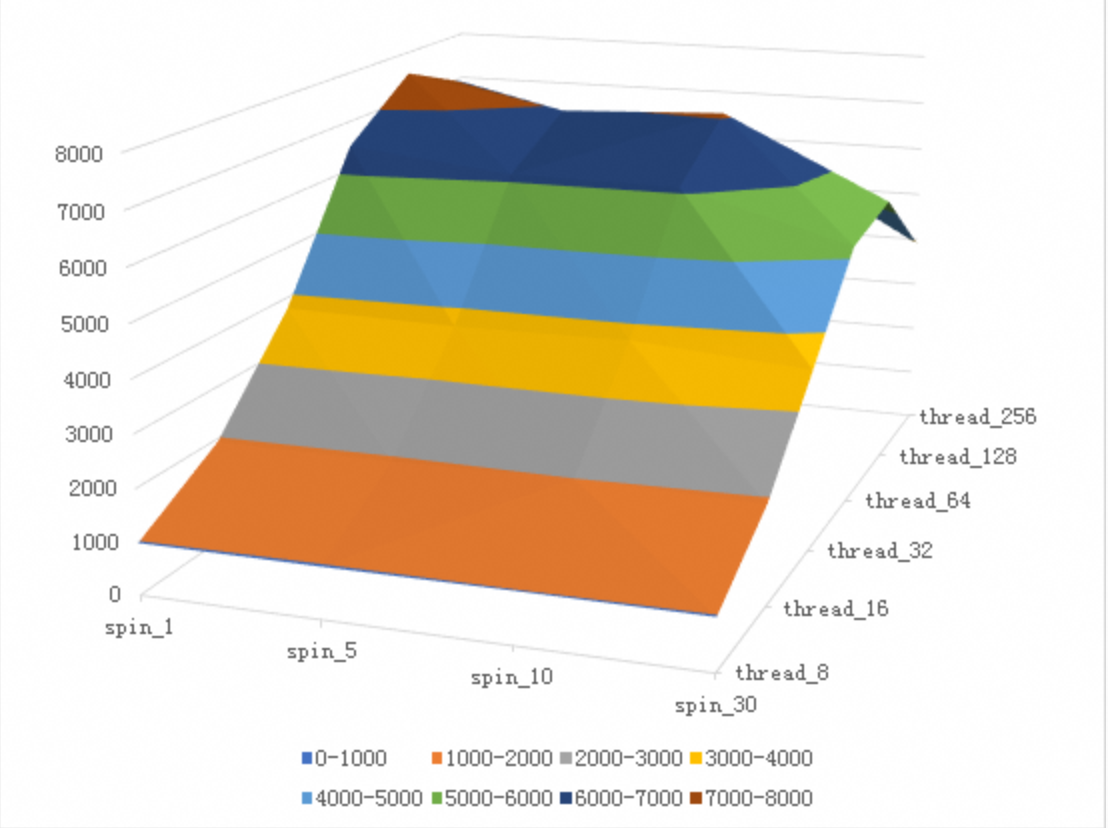
E5-2682 CPU型号在不同的delay参数和不同并发压力下的写入性能数据:
Skylake 8163 CPU型号在不同的delay参数和不同并发压力下的写入性能数据:
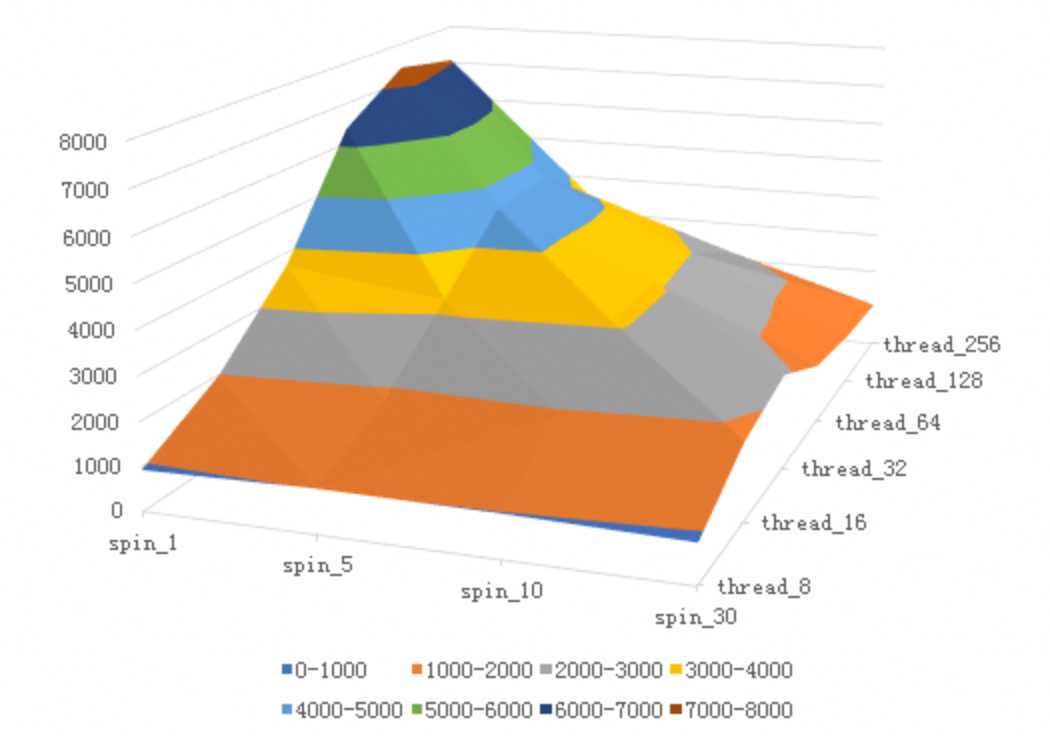
==因为8163的cycles从10改到了140,所以可以看到delay参数对性能的影响更加陡峻。==
总结分析
Intel CPU 架构不同使得 Pause 指令的CPU Cycles不同导致了 MySQL innodb_spin_wait_delay 在 spin lock 失败的时候(此时需要 Pause* innodb_spin_wait_delay*N)delay更久,使得调用方看到了MySQL更大的 RT ,进而导致 Tomcat Server上业务并发跑不起来,所以最终压力上不去。
在长链路的排查中,细化定位是哪个节点出了问题是最难的,要盯住 RT 而不是 CPU。
欲速则不达,做压测的时候还是要老老实实地从一个并发开始观察QPS、 RT ,然后一直增加压力到压不上去了,再看QPS、 RT 变化,然后确认瓶颈点。
我想追加几个问题帮大家理解
为什么要有自旋锁(内核里面的spinlock)?
等锁的时候可以释放CPU进入等待,这叫悲观锁,代价是释放CPU必然导致上下文切换,一次上下文切换至少需要几千个时钟周期,也就是CPU需要几千个时钟周期来完成上下文切换的工作(几千个时钟周期没有产出–真浪费)
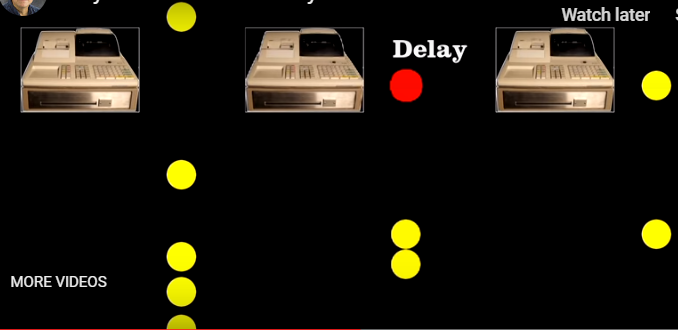
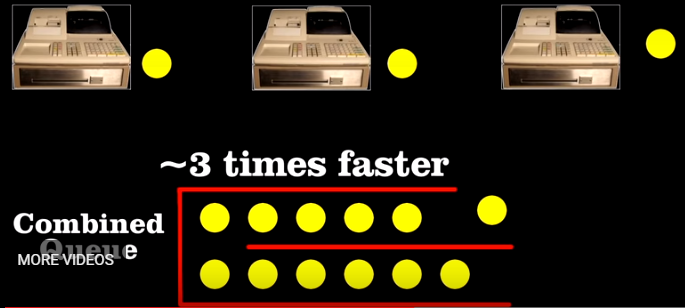
或者等锁的时候不释放CPU,赌很快能等到锁,这叫乐观锁,Linux OS用的是spinlock(类似大家看到的CAS),也就是CPU不释放一直不停地检查能否拿到锁,一个时钟周期检查一次太快了(想想你去银行柜台办业务,每秒钟问一次柜员轮到你了没有!),所以CPU工程师就在想能不能提供一条指令一直占着CPU很久,这条指令就是pause,每一个spinlock就会调用pause休息几十、几百个时钟周期后再去看看能否抢到所(柜台给你提供了沙发茶水,你坐一会再去问柜员)
执行Pause指令的时候CPU真的休息了吗?
如果没有事情做的话,CPU是会停下来(省电),如果开了超线程,如果一个核执行了Pause,那么对这个核的另一个超线程来说,白捡了100%的CPU,别人休息(Pause、stall)的时候正好给我用(这是超线程的本质)!
这也是为什么有些场景2个超线程能发挥2倍能力,有些场景2个超线程只能跑出1倍能力。
相对比上下文切换浪费的几千个时钟周期,Pause(spinlock)真是一点都没浪费。但如果你一直spinlock 几万、几十万个时钟周期都没等到锁还不释放也不对,这会导致其他线程调度不到CPU而饿死。一般自旋一段时间后都会放弃CPU转为上下文切换,所以MySQL 加了参数 innodb_spin_wait_delay 来控制spinlock的长短。
并发高导致自旋锁效率低?
如果并发高,都抢同一个锁,这里的效率会随着并发的增加而降低,不展开了,记住这个结论,类似太多人在柜台问轮到自己没有,留给柜员办业务的时间反而少了!
ARM
ARM 指令集中有 nop 来让流水线空转一个时钟周期,汇编里面的 yield 命令底层就是执行 nop 来达到目的,但是这还不够好,在64位的ARM 指令集里面增加了 ISB (instruction synchronization barrier) 来实现类似 Pause 的作用 :
On arm64 we have seen on several databases that ISB (instruction synchronization barrier) is better to use than yield in a spin loop. The yield instruction is a nop. The isb instruction puts the processor to sleep for some short time. isb is a good equivalent to the pause instruction on x86.
对比
Below is an experiment that shows the effects of yield and isb on Arm64 and the
time of a pause instruction on x86 Intel processors. The micro-benchmarks use
https://github.com/google/benchmark.git
测试代码
1 | $ cat a.cc |
测试结果
1 | $ g++ -o run a.cc -O2 -lbenchmark -lpthread |
依照如上测试结果可以看出在 ARM 指令集下一次 yield 基本耗费一个时钟周期,但是一次 isb 需要 20-30 个时钟周期,而在intel Skylate 下一次Pause 需要140个时钟周期
所以MySQL 的 aarch64 版本在2020年也终于进行了改进
参考文章
https://cloud.tencent.com/developer/article/1005284
Intel PAUSE指令变化影响到MySQL的性能,该如何解决?
ARM软硬件协同设计:锁优化, arm不同于x86,用的是yield、ISB 来代替Pause
http://cr.openjdk.java.net/~dchuyko/8186670/yield/spinwait.html
https://aloiskraus.wordpress.com/2018/06/16/why-skylakex-cpus-are-sometimes-50-slower-how-intel-has-broken-existing-code/ Windows+.NET 平台下的分析过程及修复方案